cognita soc

Security findings, triaged and on the record.

cognita soc takes what your security tools produce, Fortify results, dependency scans, penetration test reports and the privileged-access vault's own reports, and turns each into a finding with a verdict, an owner and a trail. Rules decide what rules can decide, AI assesses the rest on request, and a person signs off before anything is closed, accepted or raised as an issue.

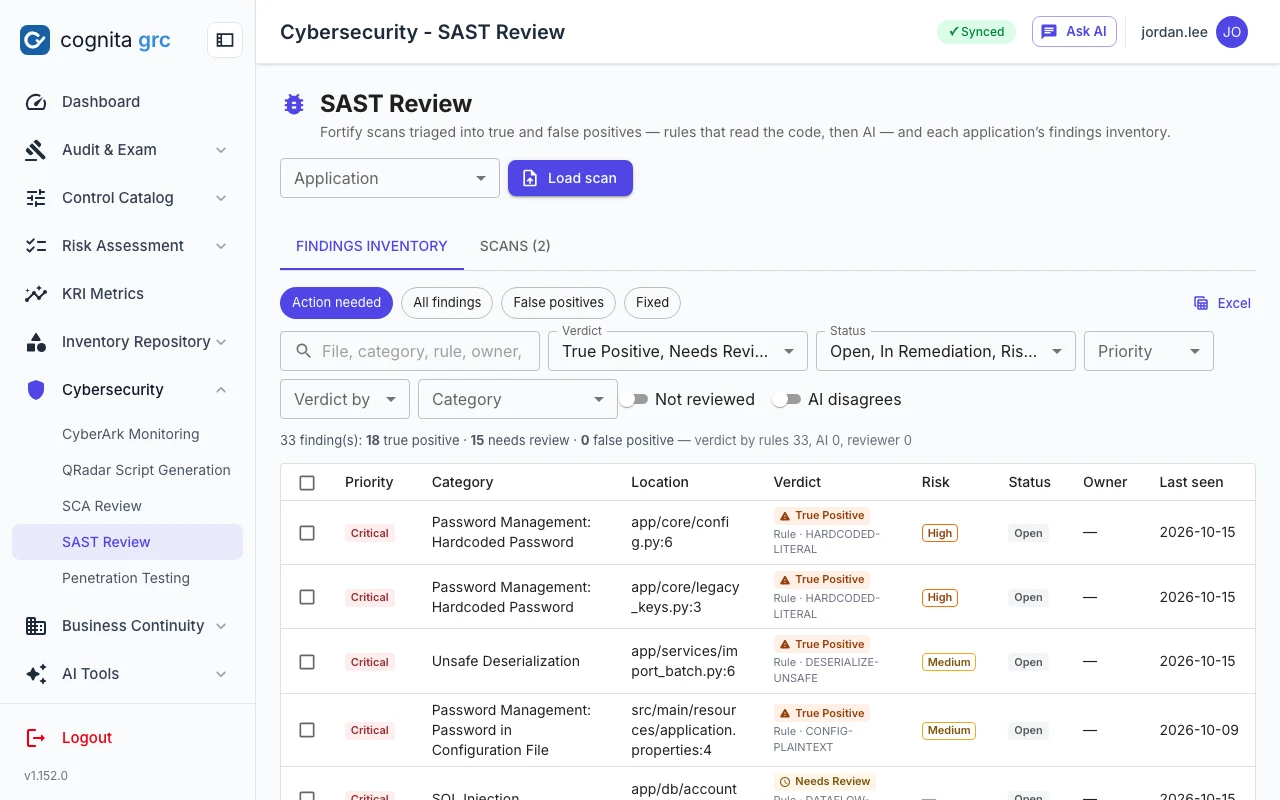
/sast-review
SAST findings inventory for an application: each Fortify finding with its priority, category, file and line, and the verdict in force with who gave it
The SAST inventory: every Fortify finding with the verdict in force and who gave it, a rule, the AI or a reviewer.
SAST review

A Fortify results file in, a triaged inventory out.

Upload the .fpr that Fortify SCA or SSC produced; nothing else is needed. The platform reads the findings, the rule metadata and the source archive inside it, so the triage rules look at the same code the scanner saw. Each upload folds into the application's inventory: findings seen before keep their verdicts, new ones are triaged, and the ones no longer reported are marked fixed.

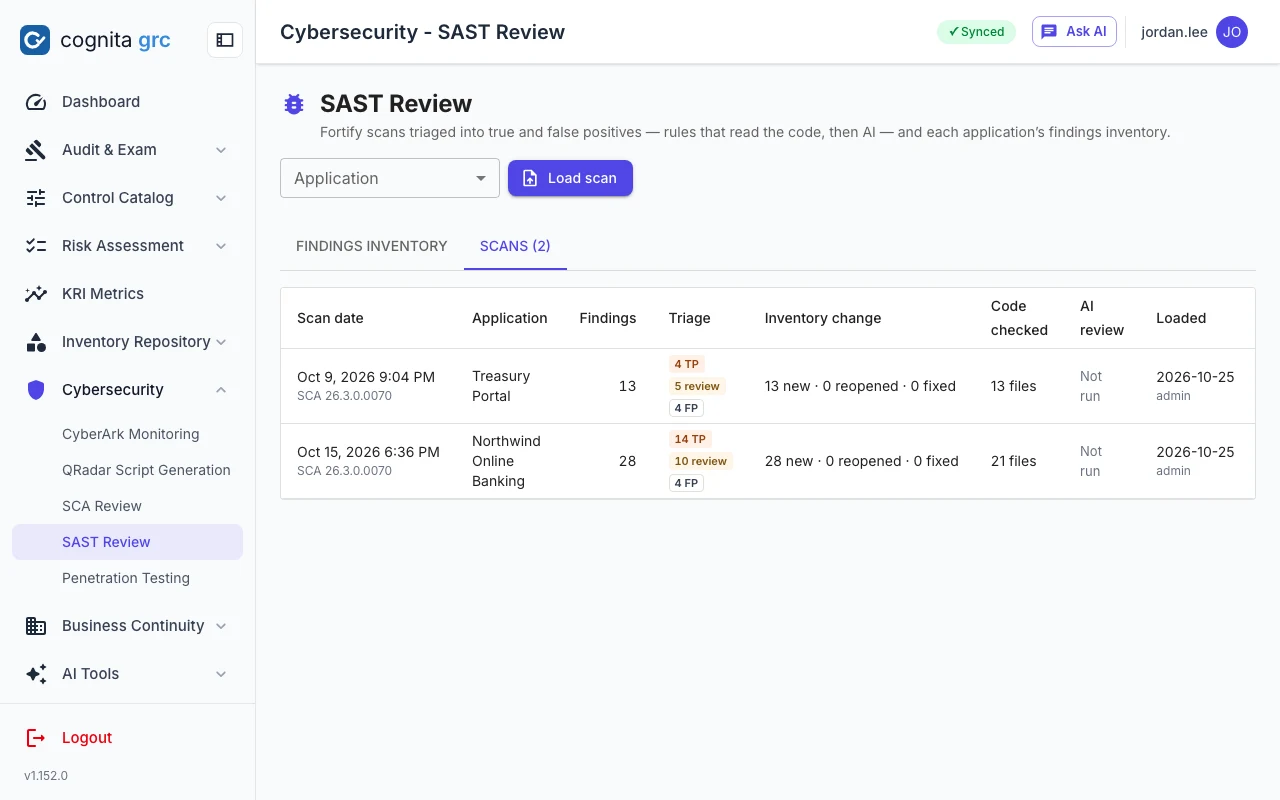
/sast-review · Scans
SAST applications and their scans, each with the scan date, engine version, findings by priority and how many were new or fixed
Applications and their scans: engine and rulepack versions, findings by priority, and what each upload changed.
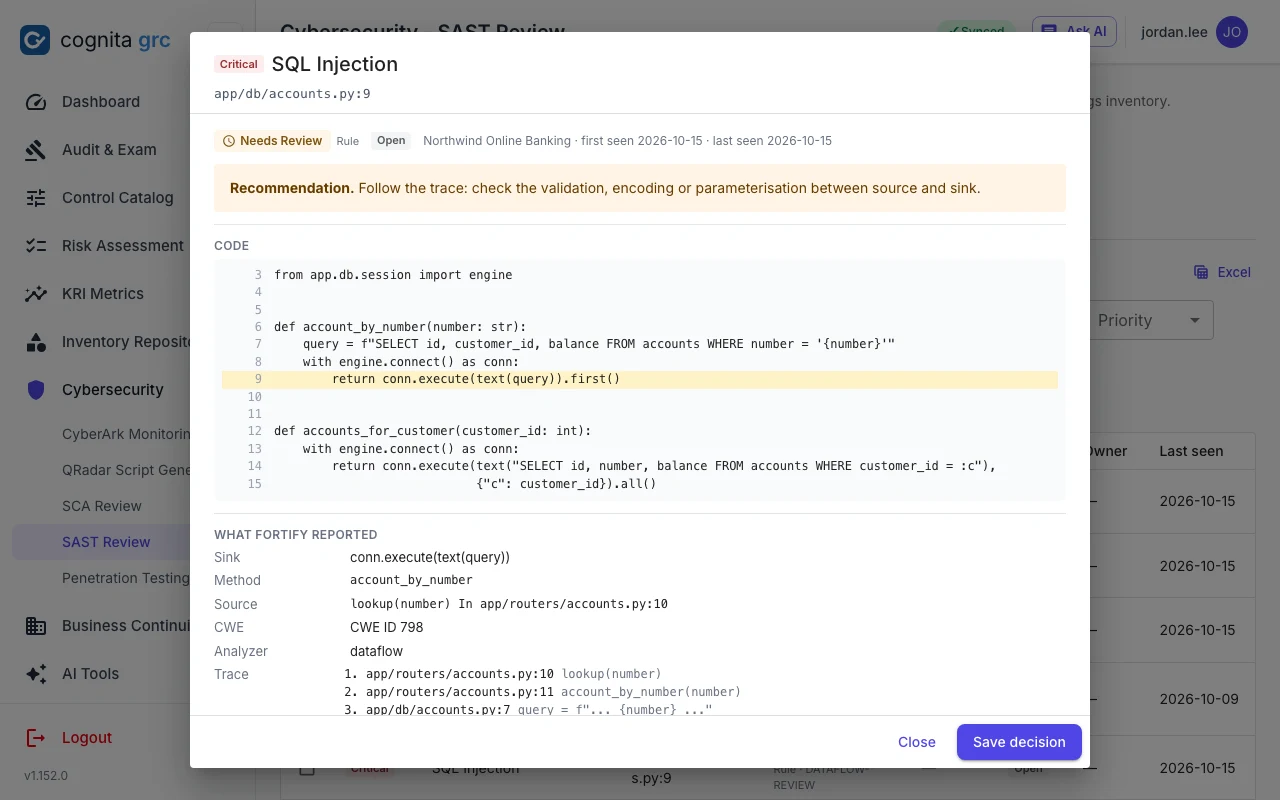
/sast-review · a finding
A SAST finding: the Fortify trace from source to sink, the code around the sink, the rule's verdict and reasoning, and the reviewer's own verdict and note
A finding: the trace from source to sink, the code at each step, the rule's reasoning, and the reviewer's verdict above it.
  • Rules that read the codeTest code kept out of the image, a comment or docstring, a test value reused in deployable code, how a React value is rendered, which Dockerfile stage runs, what a random value or weak hash is used for, which flags a cookie carries, whether a CORS origin or TLS check is a literal. Each rule gives True Positive, False Positive or Needs Review with a confidence and its reasoning.
  • Dataflow goes to reviewInjection, XSS, path manipulation, SSRF and open redirect are never decided by a rule unless the file is test code: they are shown with their trace for a reviewer or the AI.
  • AI on requestAssess one finding or the selection; the model reads the trace and the code and answers in the same verdict, risk and reasoning shape. The AI's verdict applies only where the rules could not decide. AI
  • Reviewer decidesA reviewer's verdict outranks both, can be applied to every identical finding at once, and is kept across re-uploads. Rules can be switched off per application. Reports as HTML, PDF and Excel.
SCA review

Dependency advisories, judged by what is known about them.

Upload lockfiles, manifests or an SBOM; Google OSV-Scanner runs inside the platform and every advisory becomes one record per package and version. Before any model is asked, the rules apply the facts the feeds establish: withdrawn advisories, development-only dependencies, platforms the application does not run on, CISA's Known Exploited Vulnerabilities list, the EPSS exploitation probability, and Critical flaws with a fix available.

Four verdicts, in order of urgency

  • Must Fix. Exploited in the wild (KEV), among the most-targeted (EPSS at or above your threshold), or Critical with a fixed release.
  • Verify Reachability. Serious, but whether it matters depends on how the application uses the package.
  • Needs Review. No rule decides it; the AI assessment or a reviewer does. AI
  • Not Applicable. Withdrawn, development-only, or for another platform, with the reason kept.

A source reachability check takes a zip of the code and reports whether the vulnerable package is imported at all. Must Fix findings left open raise an issue in the Issue Tracker.

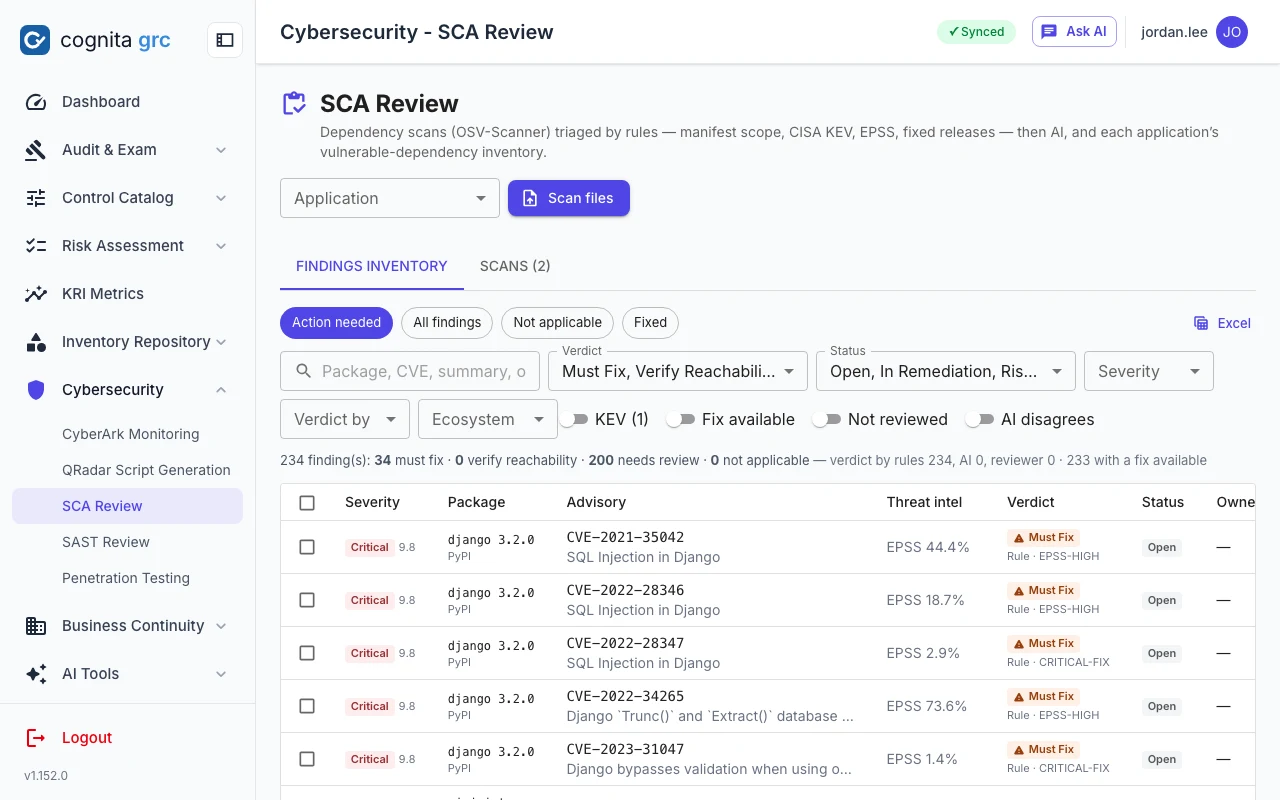
/sca-review
SCA findings inventory: advisories per package with severity, KEV and EPSS markers, the fixed version and the verdict
The inventory for one application: advisory, package and version, the fixed release, KEV and EPSS, and the verdict with its rule.
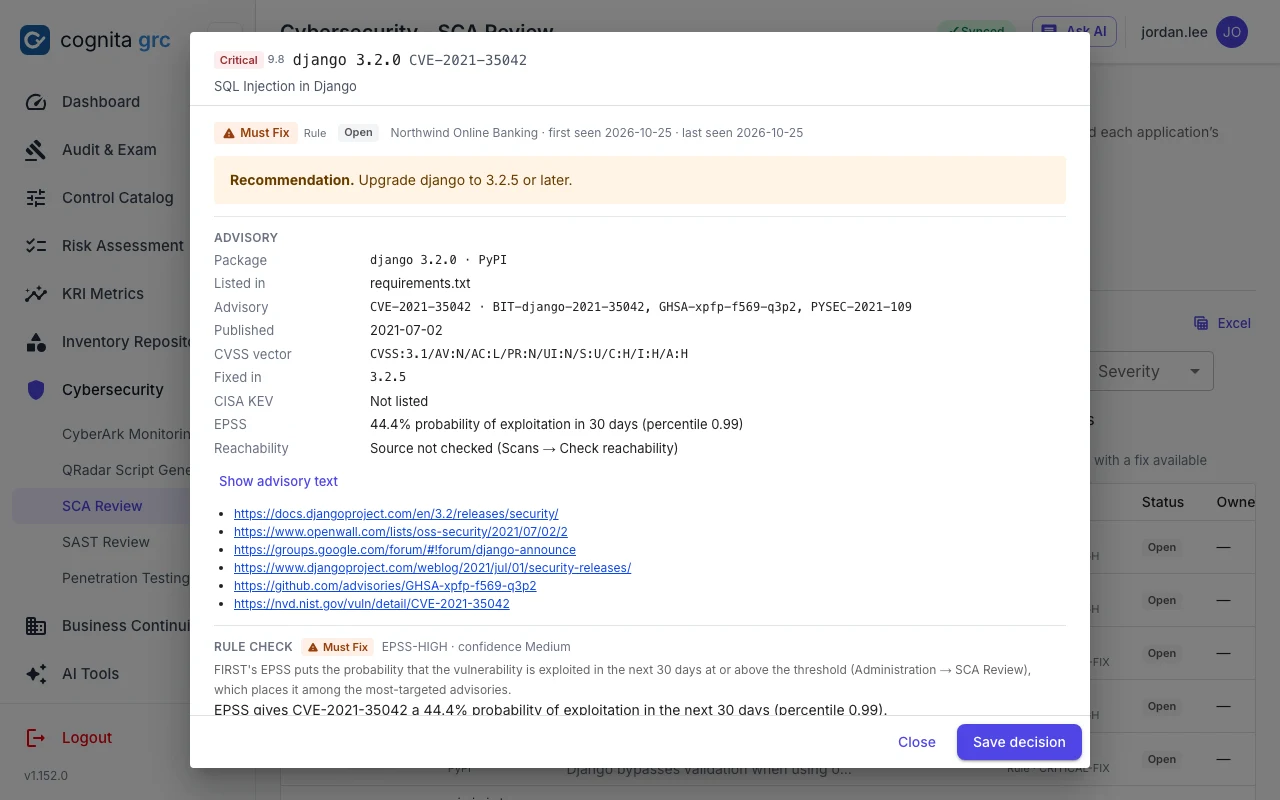
/sca-review · an advisory
An SCA finding: the advisory text and references, which uploaded files list the package and whether as a development dependency, the rule applied and the reviewer's verdict
An advisory: its text and references, the files that list the package, the rule that applied and the reviewer's own verdict and note.
Penetration testing

Test results that arrive as records, not as a PDF to retype.

Tests are run with cognita probe, a scoped, logged penetration-testing tool driven from Claude Code with a Kali-based sandbox. At the end of an engagement pt export grc-package writes a signed package: the engagement, every finding with its evidence, every test case with its result, the screenshots, and the report PDF. cognita soc imports the package, refuses one that was altered after it was built, and tracks each finding from there.

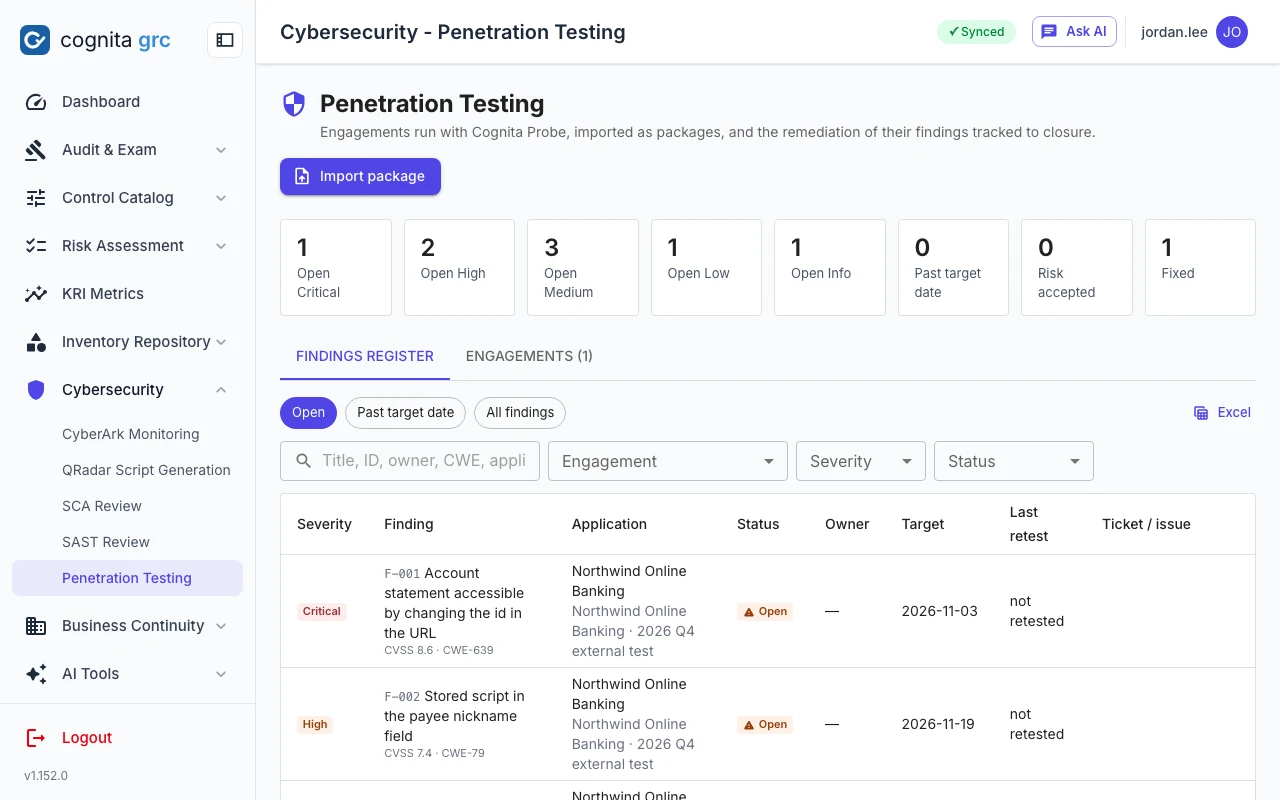
/penetration-testing
Penetration testing overview: open findings by severity and overdue counts across engagements, and the engagement list with application, window, tester and report version
Open findings by severity and what is past its target date across every engagement, above the findings register.
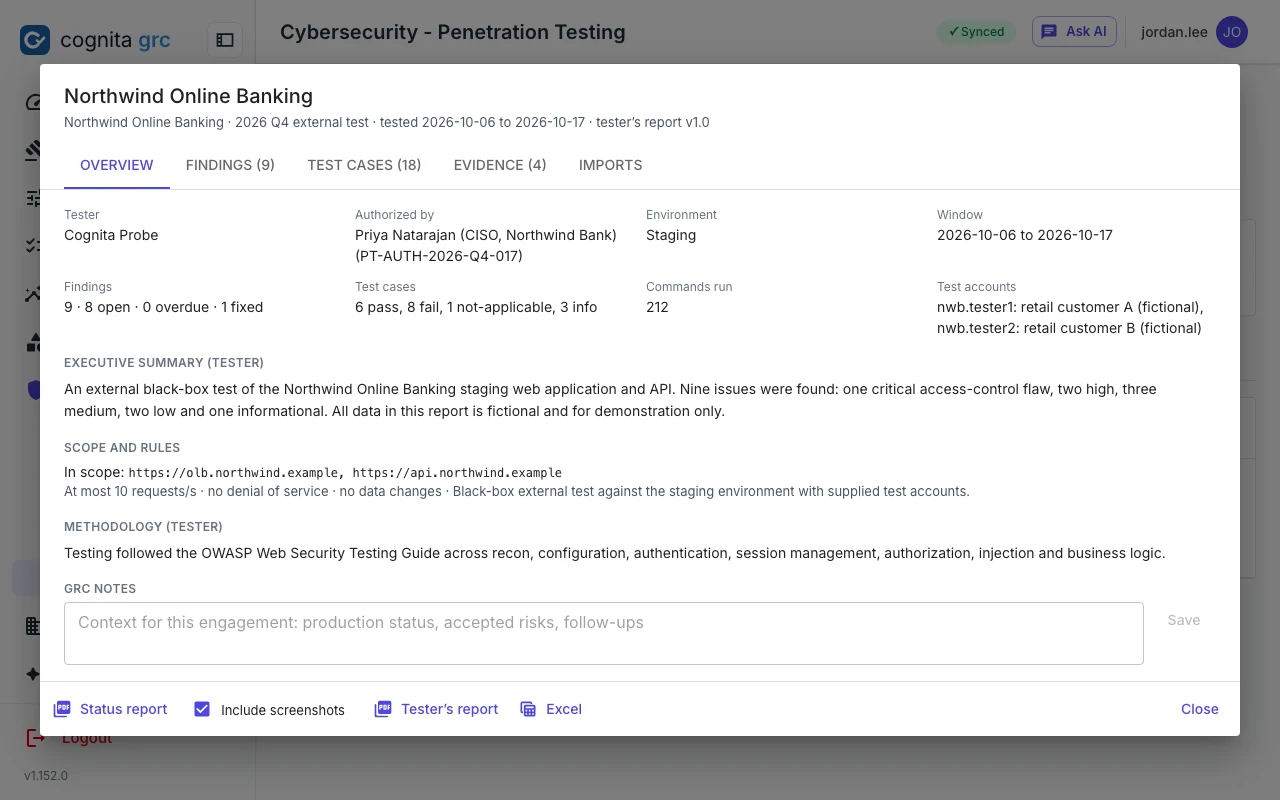
  • Engagement recordScope in and out, rules of engagement, test accounts, authorisation, the testing window, scope changes and the number of commands run, as the tester recorded them.
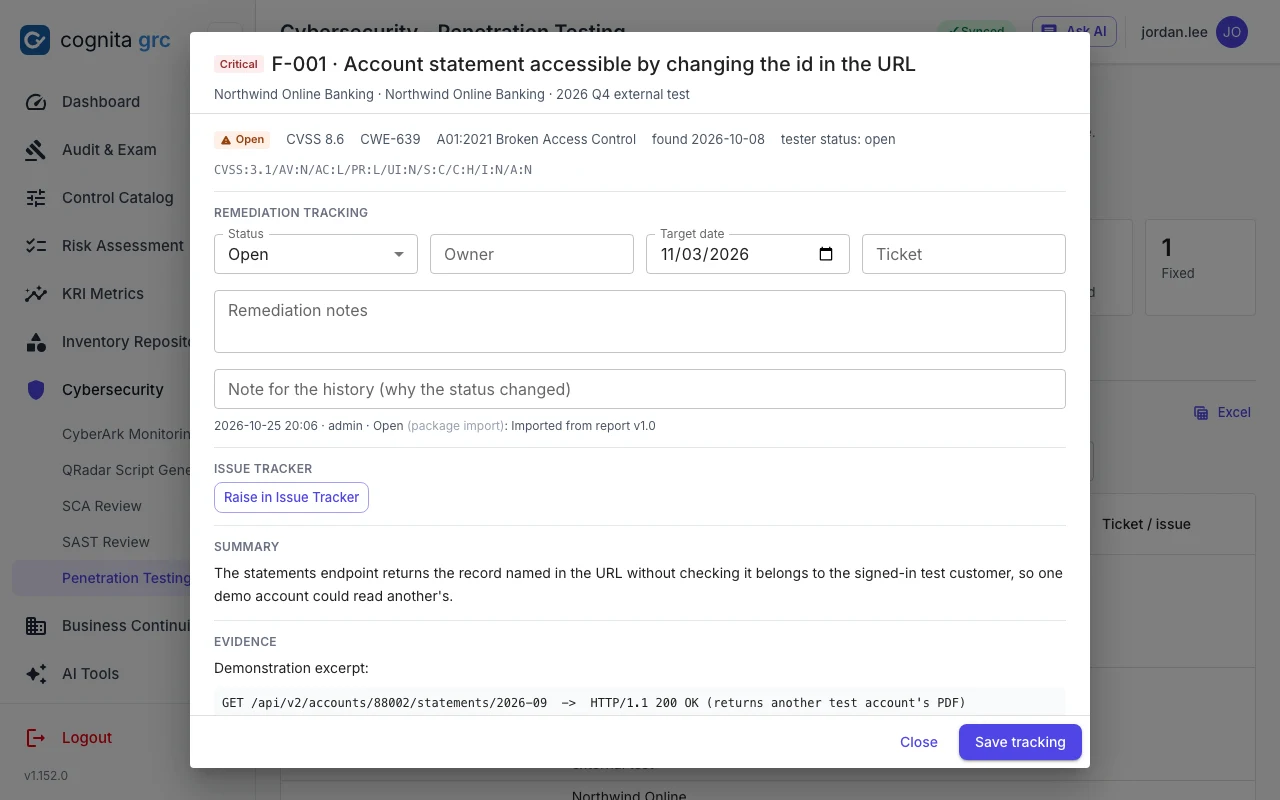
  • Findings registerSeverity, CVSS, CWE and OWASP, affected endpoints, evidence and remediation, with screenshots attached to the finding they prove. Tracking status, owner, target date and notes belong to you and survive a re-import.
  • Re-import trackingA retest package that marks a finding fixed closes it; one that finds it again reopens it; a status you set in between is kept. Importing an older package than the one already loaded is refused unless you say so.
  • Test casesEvery test the tester ran, by area, with its method, result and the finding it led to, so a reviewer sees what was tried and found clean, not only what failed.
  • Reports and issuesThe tester's PDF kept with the engagement, a GRC-side report and an Excel export, and any finding raised as an Issue Tracker item with its severity mapped to the issue rating.
/penetration-testing · Findings
An engagement's overview: application, tester, authorisation, testing window, scope in and out, rules of engagement and test accounts, with findings, test cases, evidence and imports on further tabs
An engagement as the tester recorded it: scope, rules, window and accounts, with its findings, test cases, evidence and imports on the other tabs.
/penetration-testing · a finding
A penetration test finding with its summary, evidence excerpt, remediation, screenshot evidence and the tracking fields
A finding: the tester's facts below, your remediation tracking above, and a one-click issue.
Privileged access

The vault's own reports, reviewed every week by the same thirty rules.

Each week the four CyberArk PVWA reports are uploaded together: activities, users, the privileged accounts inventory and license capacity. The platform recognises each by its columns, checks that the period is seven days, and runs the rules against the week and against the previous review, so what is new since last week stands out. Every hit becomes an exception a reviewer answers, and the week is signed off when they are done.

/cyberark-monitoring
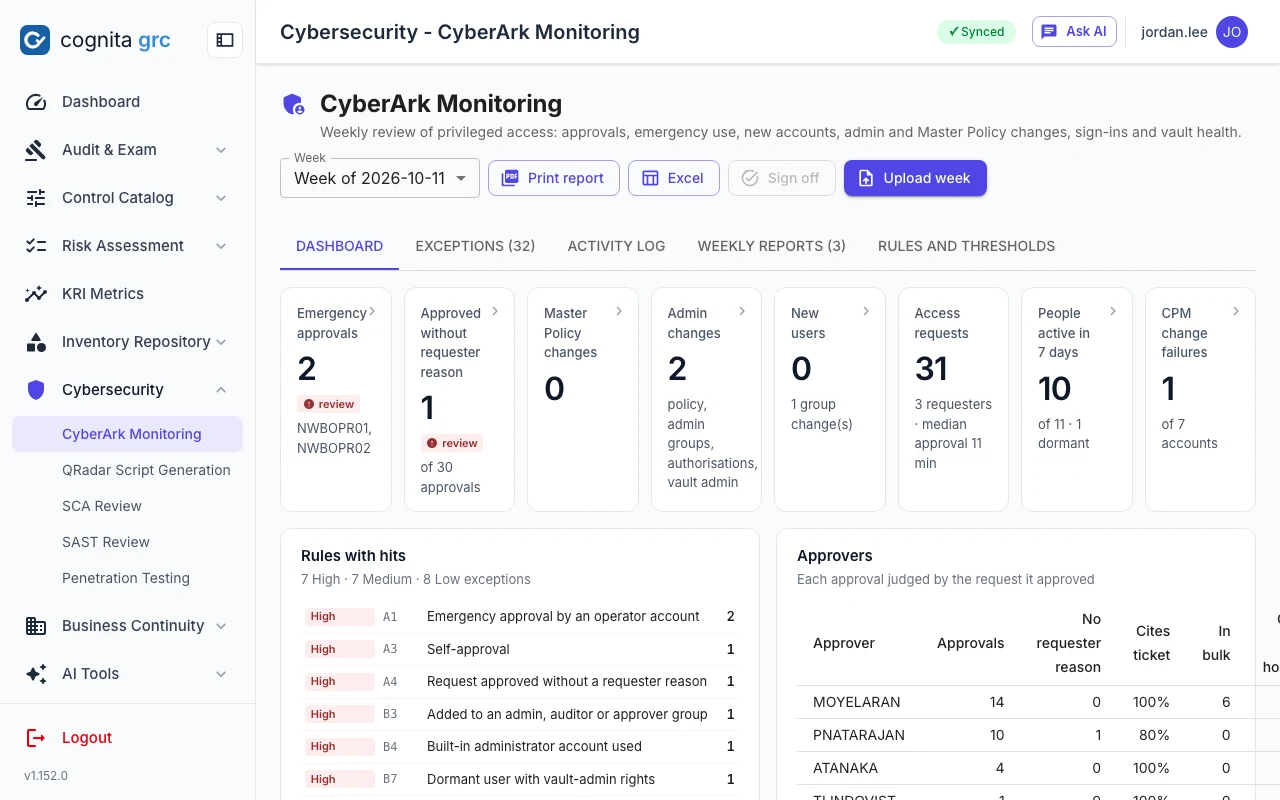
A week's CyberArk review: risk level, exceptions by severity, access requests and approvals, emergency approvals, new users and CPM failures, with charts for the week
A week: its risk level, the exceptions by severity, requests and approvals, and the trend against earlier weeks.
/cyberark-monitoring · Exceptions
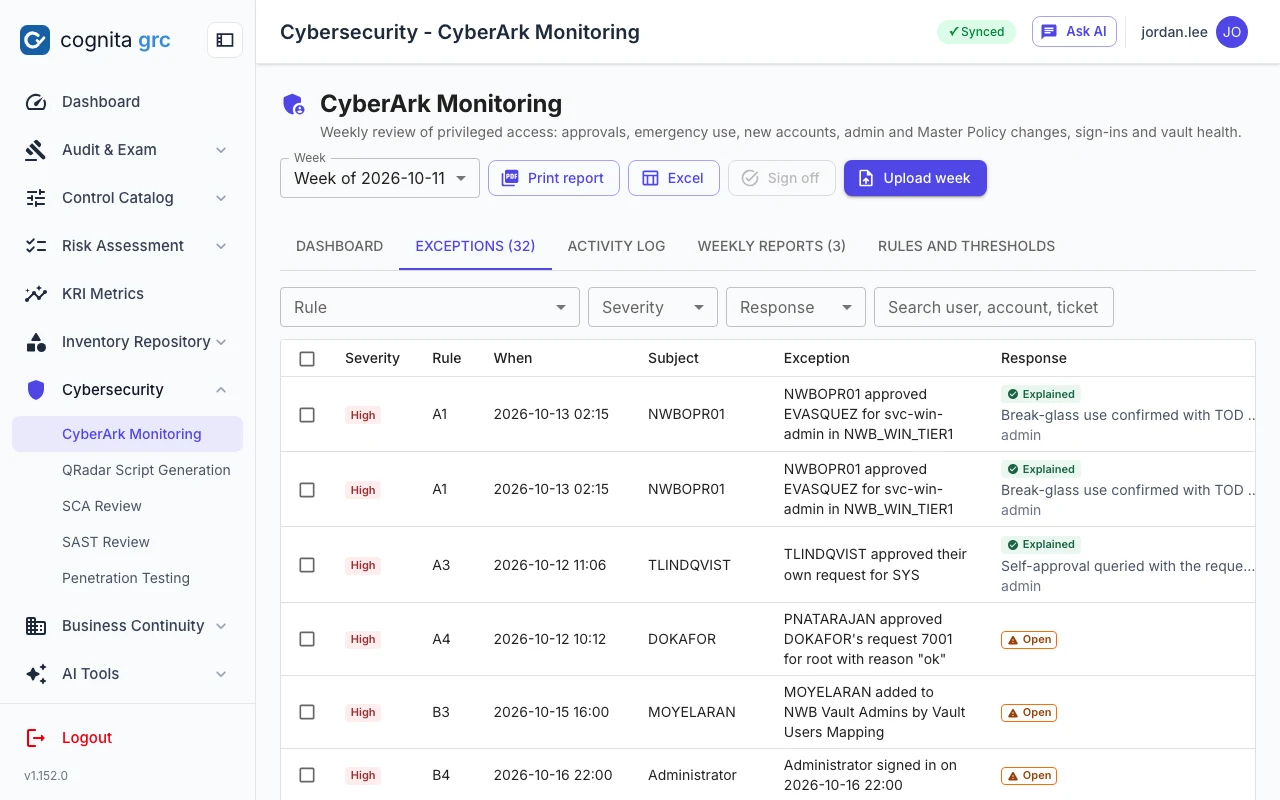
The exceptions register for a week: rule, severity, subject, detail and the reviewer's response on each
The exceptions register: one row per rule hit, with the reviewer's response and the ticket it refers to.
  • ApprovalsRequest approved without a requester reason, self-approval, emergency operator approvals and sign-ins, bulk approvals in one minute, requests without a ticket number, access windows longer than allowed, approvals out of hours, requests never finally approved.
  • Accounts and administrationNew vault users, group membership changes and additions to admin, auditor or approver groups, built-in administrator sign-ins, dormant users and dormant users with vault-admin rights, locally defined people, authorisations added, Master Policy and vault administration changes.
  • Inventory and capacityCPM change and verification failures, passwords older than allowed, accounts in test or decommission safes, new and removed privileged accounts, and license pools nearly full.
  • Your thresholdsDormancy, bulk-approval count, access-window hours, business hours and password age are settings; each rule can be switched off or given a different severity, and the review says which rules were not applied.
  • Sign-off and reportA reviewer signs the week off with a note, can reopen it, and prints a report of the sections they choose. The activity log keeps every row of the week for search.
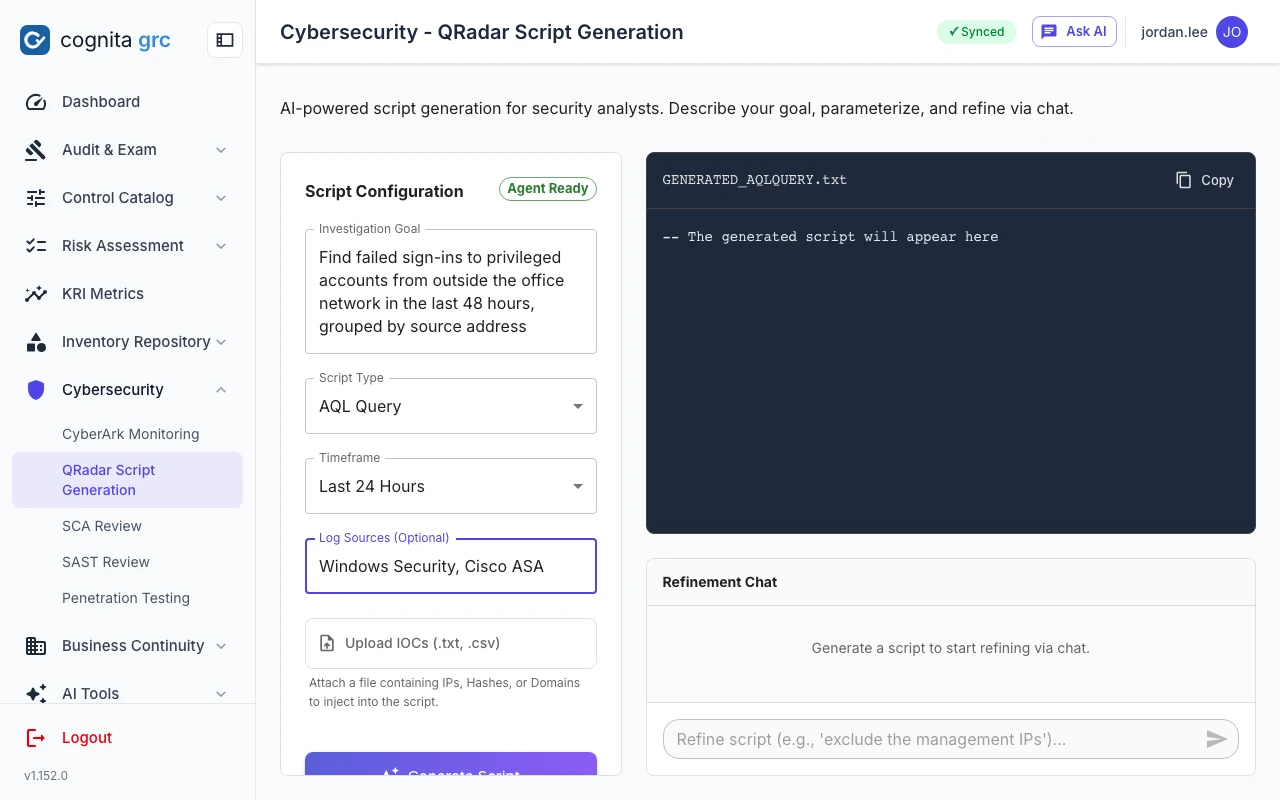
QRadar scripts

An investigation goal in, an AQL search out.

Describe what you are looking for, the time frame and the log sources, and get the AQL query or detection rule, with a refinement chat to narrow it. The script is yours to review and run; nothing is sent to QRadar. AI

/qradar-script
QRadar script generation: investigation goal, script type, time frame and log sources on the left, the generated script and a refinement chat on the right
How findings are judged

Rules, then AI, then a person, and the order never changes.

StepWhat it readsWhat it may do
RulesThe code in the FPR, the manifest and the feeds, the vault report rows.Give a verdict with a confidence and the reasoning, or send the finding to review. Deterministic and testable.
AIThe trace, the code around it, the advisory text, as data, never as instructions.Propose a verdict and risk in the same shape, only where asked, and only applied where the rules could not decide. AI
ReviewerEverything above.Set the verdict in force, apply it to identical findings, respond to an exception, sign a week off, raise an issue, accept a risk.

The verdict in force and who gave it are shown on every finding. Reviewer verdicts survive re-uploads and re-imports; AI output is never saved without edit rights; every verdict, response, sign-off and issue is in the audit trail.

How soc is delivered

The security workspace of the cognita platform.

cognita soc ships with cognita grc today, as the Cybersecurity group of modules on the same installation. It uses the same sign-in, the same roles with view or edit per module, the same audit trail and the same Issue Tracker, so a pentest finding raised as an issue appears beside audit and regulatory issues, and an examiner's request can cite it. A role that holds only the soc modules sees only soc.

  • One installationThe same Docker Compose stack, database and backups as cognita grc; nothing extra to run.
  • Scanner tooling insideOSV-Scanner runs in the backend image; Fortify, CyberArk and cognita probe stay where they are and hand over files.
  • Same AI gatewayThe platform-wide switch, the model allowlist and the usage metering cover every soc assessment.
cognita soc

Bring one Fortify results file to the demo.

We will load it, show which findings the rules decided and why, run the AI assessment on the rest, and raise one as an issue.

cognita soc screenshots show a fictional bank's demonstration data: invented applications, code, findings and vault users.