cognita grc

Governance, risk and compliance, exam-ready every day.

cognita grc replaces workpapers scattered across spreadsheets and documents with one audited workspace: audits and exams, controls and policies, regulatory and security assessments, monthly risk indicators, inventories and business continuity. About thirty AI actions draft, score and review the work, behind a switch your administrator controls, and your people sign in with the corporate directory they already use.

/
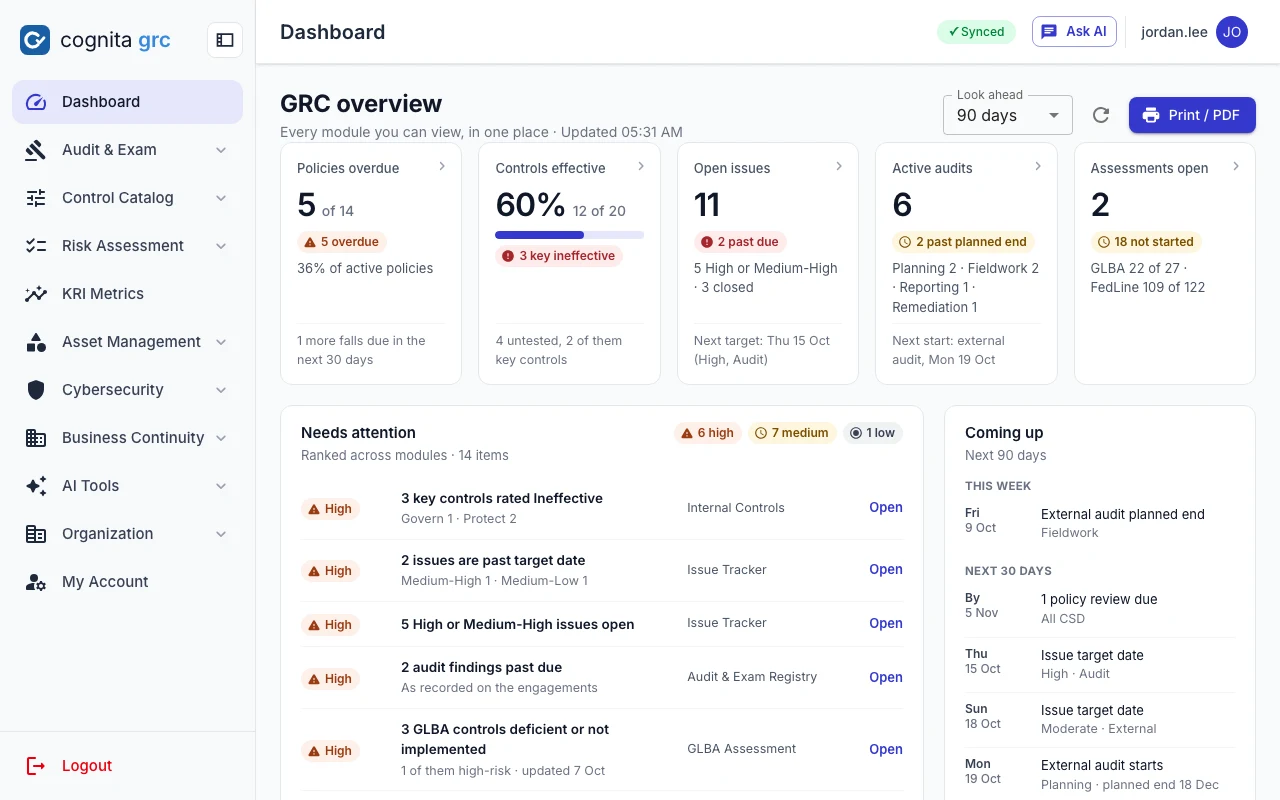
cognita grc overview with five headline tiles, a ranked needs-attention queue and a coming-up timeline
The GRC overview: headline tiles that open the list behind them, one queue of what needs attention across modules, and what falls due next.
GRC overview

Every module you can open, on one page.

The home page is worked out on the server from shared definitions of open, overdue and due soon, so every number means the same thing everywhere. It carries counts and dates only, never the text inside records, and it covers just the modules each person can open.

  • Headline tilesPolicies overdue, controls effective, open issues, active audits and open assessments. Each tile opens the filtered list behind it.
  • Needs attentionOne queue ranked across modules, worst first: ineffective key controls, past-due issues and findings, deficient assessment controls, KRIs in breach.
  • Coming upTarget dates, audit starts and ends, and policy reviews falling due inside a look-ahead window you choose.
  • Charts with a table viewControl effectiveness by NIST CSF function and policy reviews by department, plus assessment progress, the audit pipeline and a tile for each remaining area.
/ · below the fold
Dashboard charts: control effectiveness by NIST CSF function, policy review status by department, assessment progress and the audit and exam pipeline
Colour appears only where action is needed, and every status carries an icon and a label. A print view renders the same figures as a PDF.
Audit & Exam

From the first request list to the regulator's last question.

Track internal, external and regulatory engagements, the issues they raise, and the answers you send back.

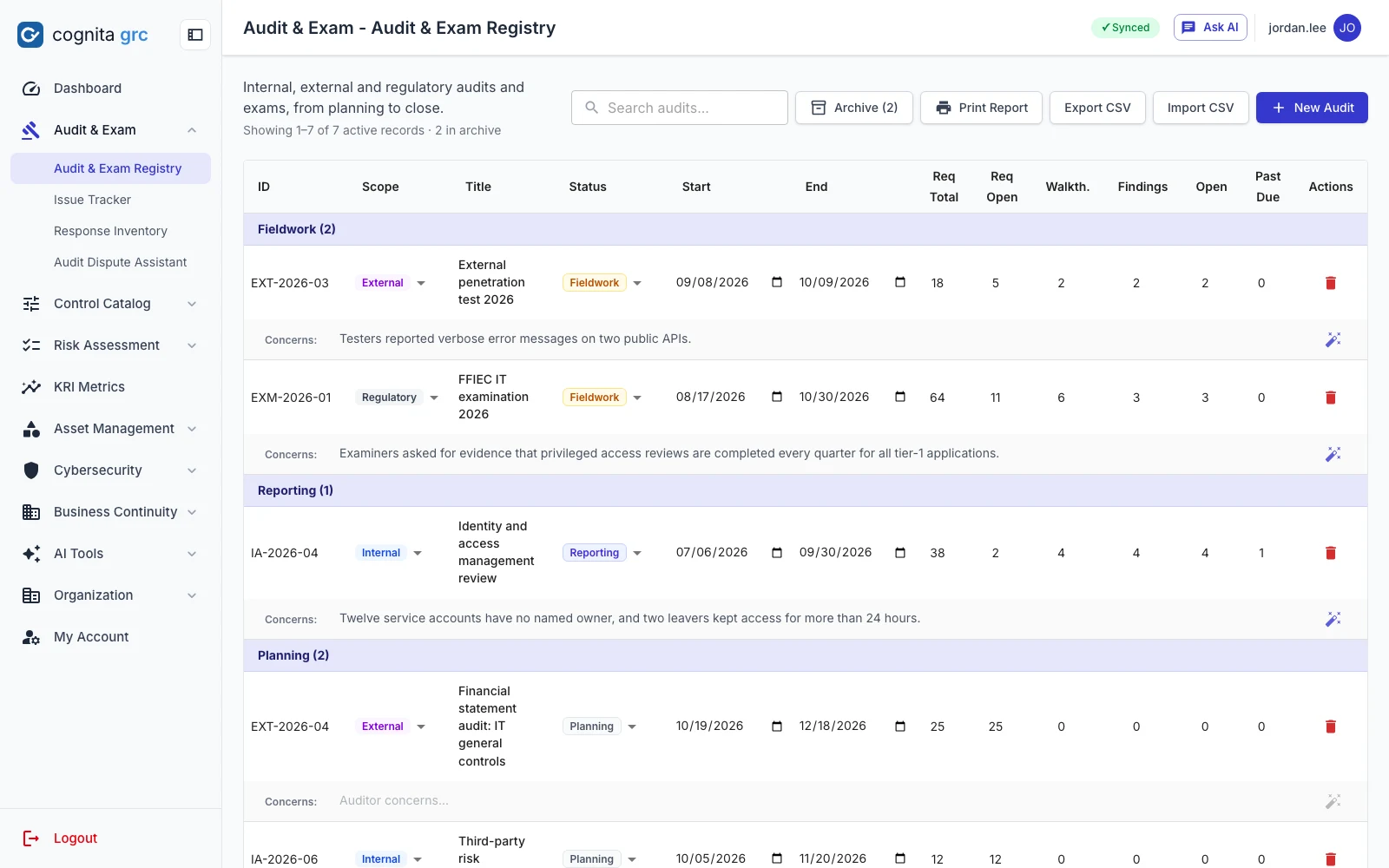
/audits/registry
Audit and exam registry grouped by status, with requests, walkthroughs, findings and past-due counts per engagement
Engagements grouped by status, with requests, walkthroughs, findings and past-due counts. Completed audits move to an archive.
  • Audit & exam registrySeven statuses from Planning to Completed, key risks and auditor concerns with a per-row AI rewrite, server-side search, CSV import and export.
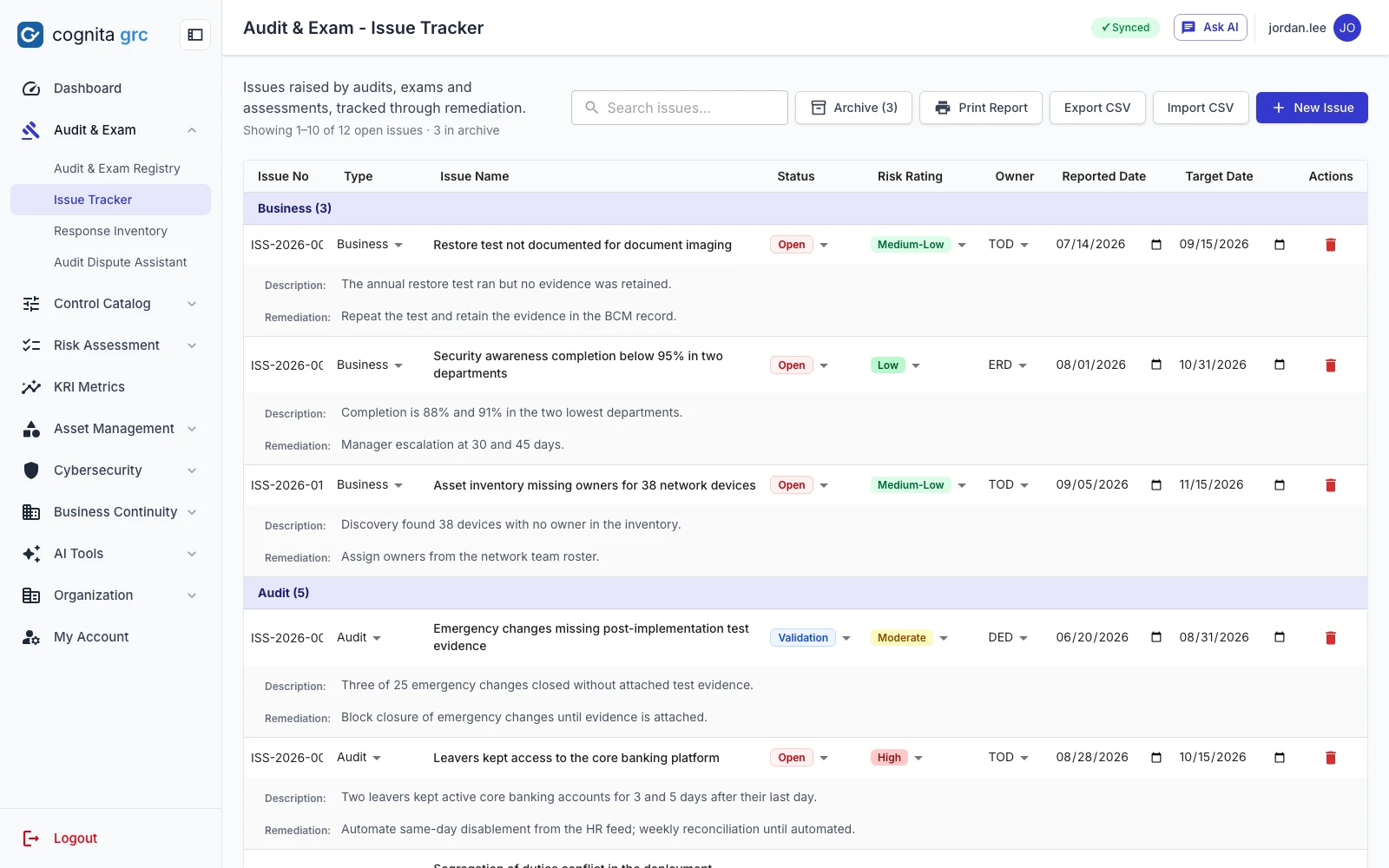
  • Issue trackerBusiness, audit, regulatory and external issues on a five-level rating, with owners, target dates, remediation plans and an archive for closed items.
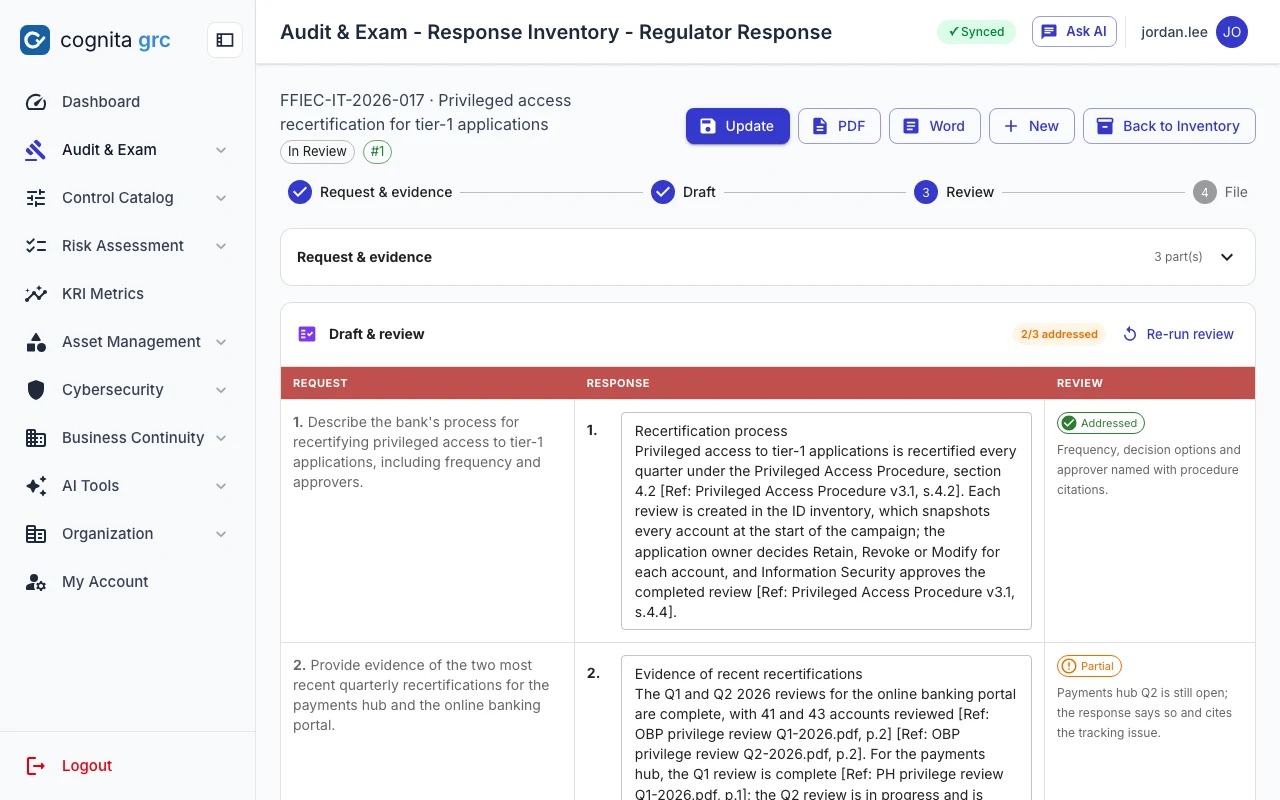
  • Regulator responseAnswer an examiner's request from their wording, your notes and your evidence files. Citations come only from identifiers the evidence carries. AI
  • Audit dispute assistantStructured responses to findings you disagree with, with OCC and NIST references, optionally grounded in your procedure. AI
/audits/regulator-response
Regulator response workspace pairing each part of the request with its answer and a QA verdict
Each part of the request sits beside its answer and its QA verdict: addressed, partial or missing.
/issues
Issue tracker grouped by type with status, rating, owner and dates
Issues grouped by type, ten per page, with the printed report covering open items.
A QA review re-reads every draft response part by part and flags what an examiner would challenge, including citations that do not check out. Responses export to PDF and editable Word.
Control Catalog

Controls and policies you can test, report and keep current.

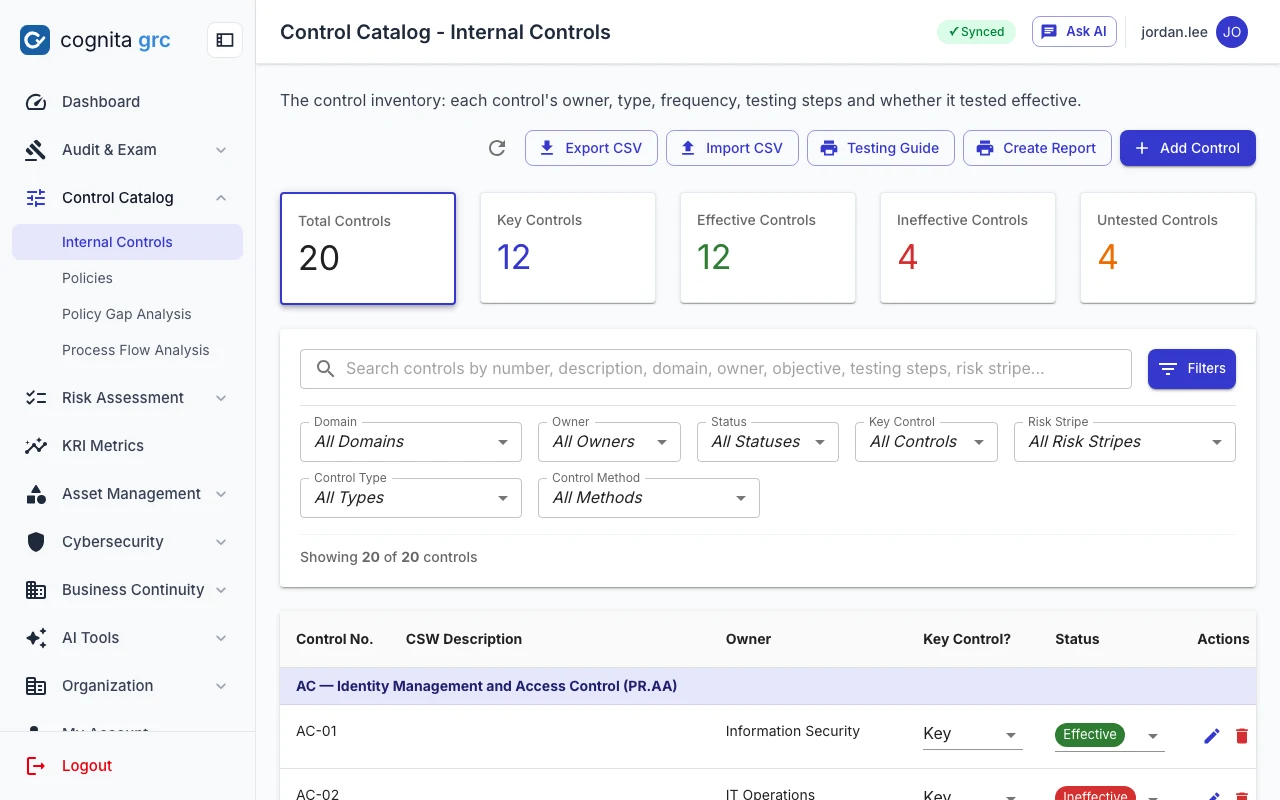
/rcsa/inventory
Internal controls with totals for key, effective, ineffective and untested controls
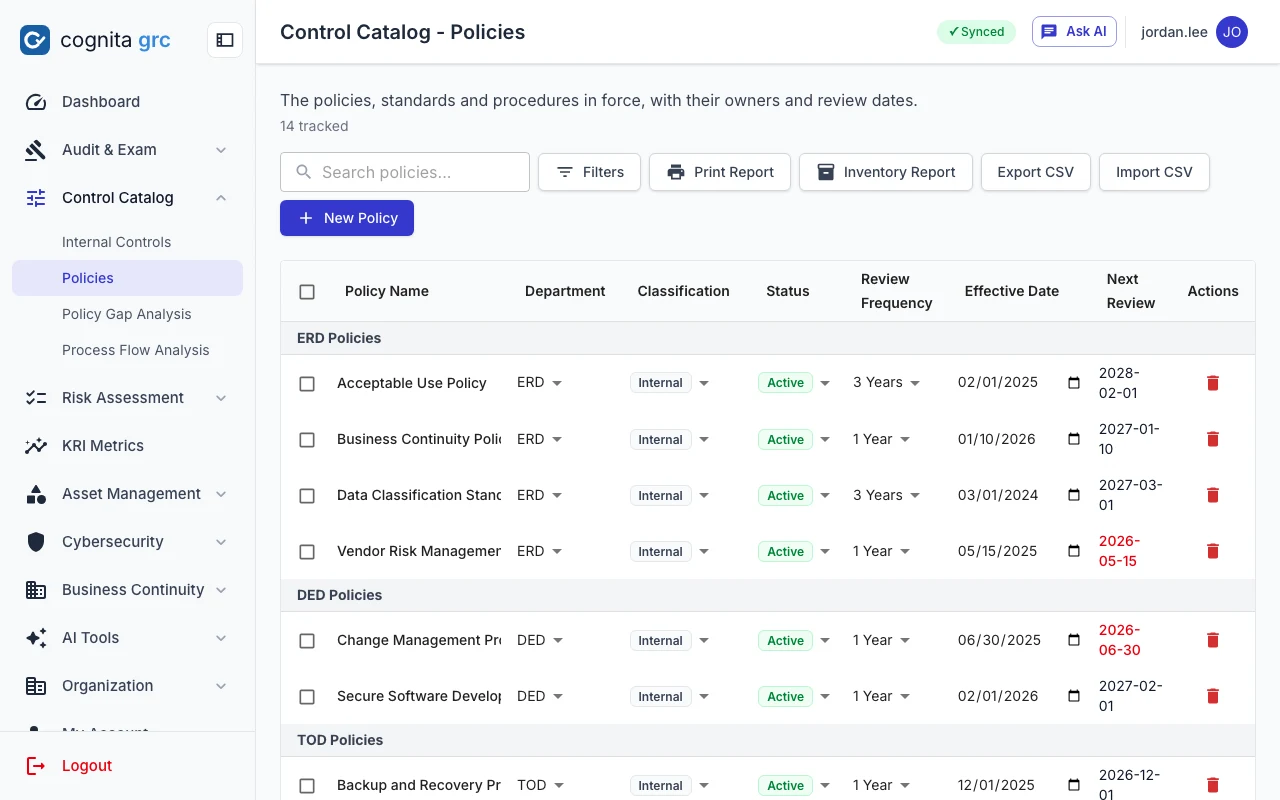
/policies
Policy inventory by department with computed next-review dates, overdue ones in red
  • Internal controlsOwner, domain, key-control flag, type, method, frequency and the sample size its population requires, with a testing guide printed one page per control.
  • PoliciesReview frequency sets the next review date; overdue reviews stand out. Set fields across many policies at once, and only the fields you choose are written.
  • Policy gap analysisAssess a policy against NIST CSF 2.0 or the OCC Cybersecurity Supervision Work Program, or align a first-line procedure with its second-line standard. AI
  • Process flow analysisDescribe a procedure or upload a picture of it; get its risks, controls and a diagram with colour-coded risk and control nodes. AI
Risk Assessment

Regulatory and security assessments with the rules built in.

Ratings are derived the way the source workbooks derive them, so every assessment scores the same way and prints in the shape reviewers expect.

GLBA information security program

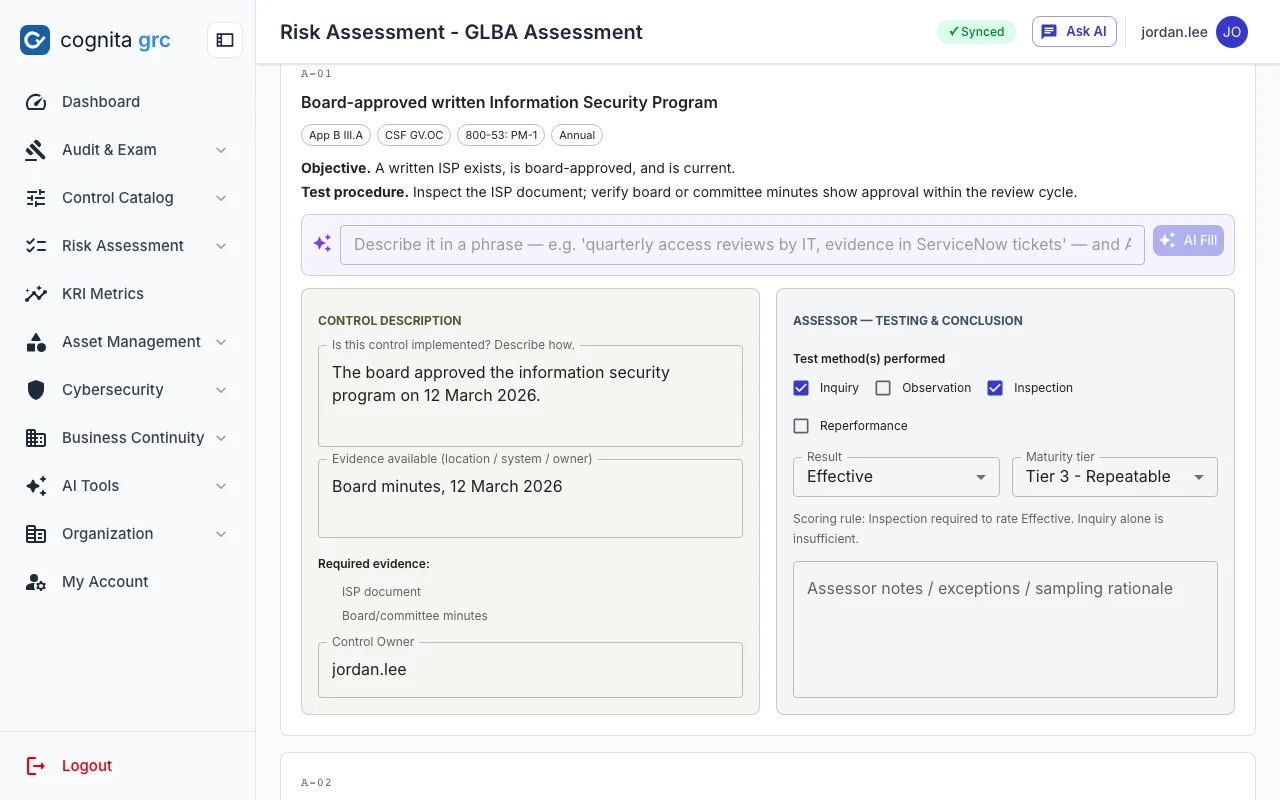
27 controls in six domains against the Interagency Guidelines (12 CFR Part 30, Appendix B) and Regulation P. The control owner's description and evidence are kept apart from the assessor's result, test methods and maturity tier.

  • "Effective" requires Inspection; high-risk controls also require Reperformance
  • AI Fill expands a short phrase into the description, evidence and notes AI
  • AI QA review flags unassessed high-risk controls, rule violations and thin support AI
  • Assessment-level observations with their own action items
/glba/1
A GLBA control with separate owner and assessor zones, test methods, result and maturity tier
The scoring rule is shown where the assessor rates the control: Inquiry alone cannot make it Effective.
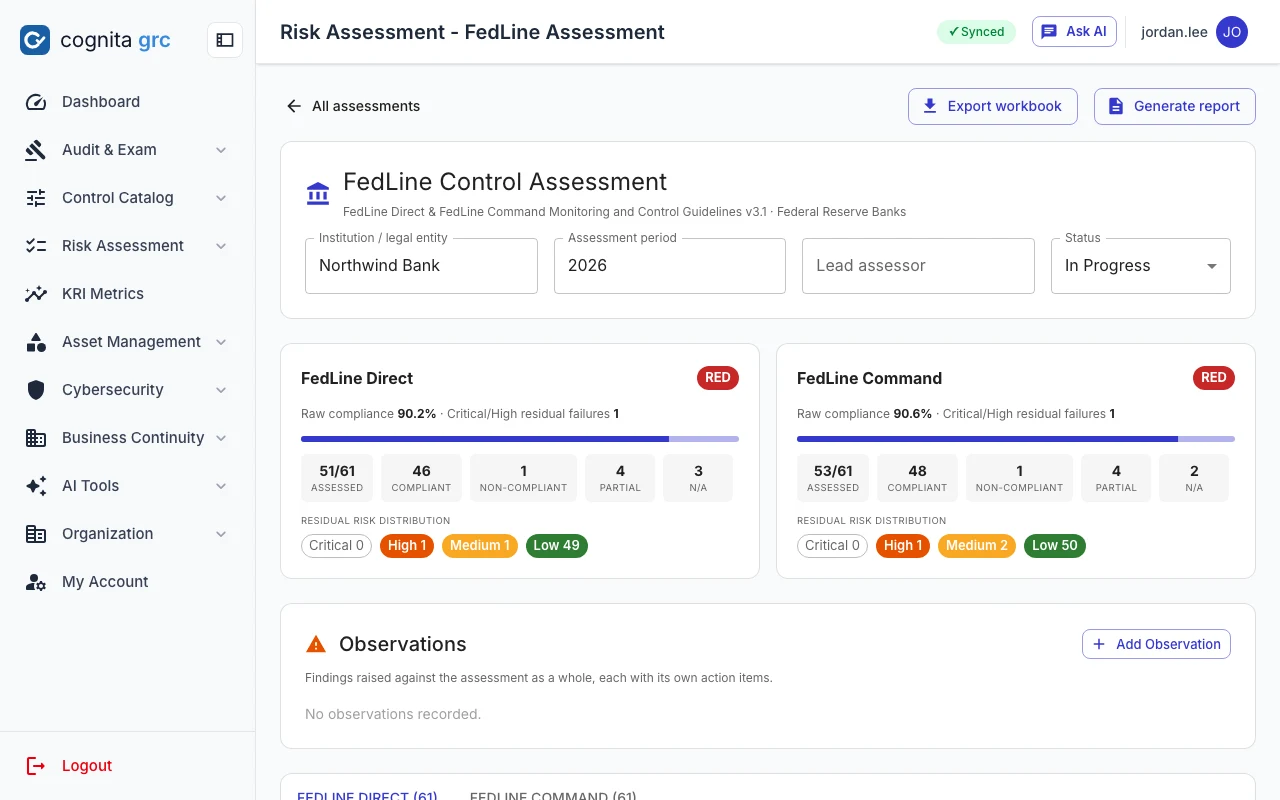
/fedline/1
FedLine assessment with Direct and Command cards rated red, compliance percentages and residual risk distribution
FedLine: any non-compliant control, or any critical or high failure, forces the solution to red regardless of the compliance percentage.
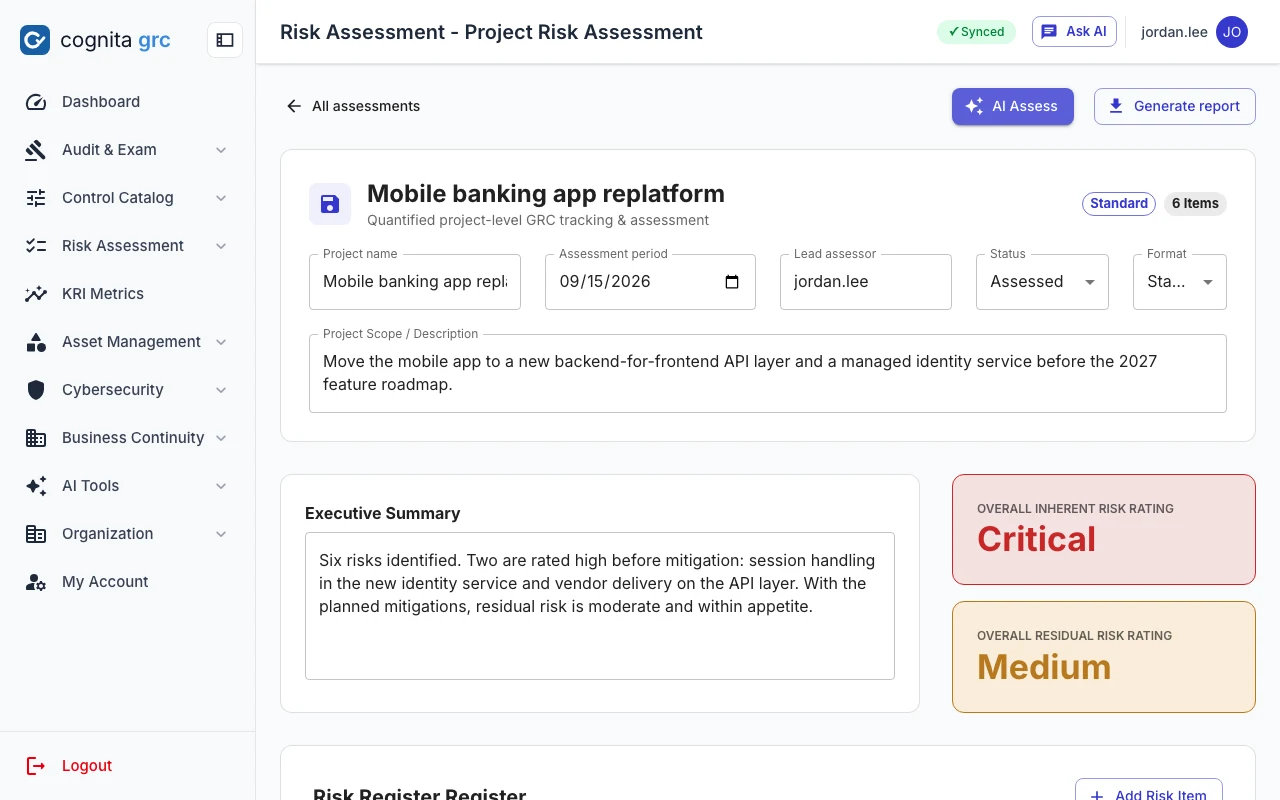
/project/risk-assessment/1
Project risk assessment with overall inherent rating Critical and residual rating Medium
Project risk: ratings on a 5×5 matrix are always recomputed on the server; the PDF report adds a residual heatmap.
  • FedLine122 controls across 19 domains. Compliance status and residual risk are derived from inherent risk and the result; exports match the source workbook.
  • Information security, data movement and CIAMAI reads the change documents or data flow diagrams and proposes the test plan from the shipped control libraries. AI
  • Cybersecurity tool assessmentThe annual health review of a security tool itself. AI proposes review items for its class; a baseline catalogue loads if the model is unavailable. AI
  • Project risk assessmentAI scores risks from project documents into a standard register or a CRAID log; people adjust and approve. AI
/project/tool-assessment-plan/1
Tool assessment plan with review items grouped by domain, each marked mandatory
A tool assessment plan: review items grouped by domain, each with the procedure to follow and the evidence to obtain.
KRI Metrics

A month of readings, judged against each indicator's own limits.

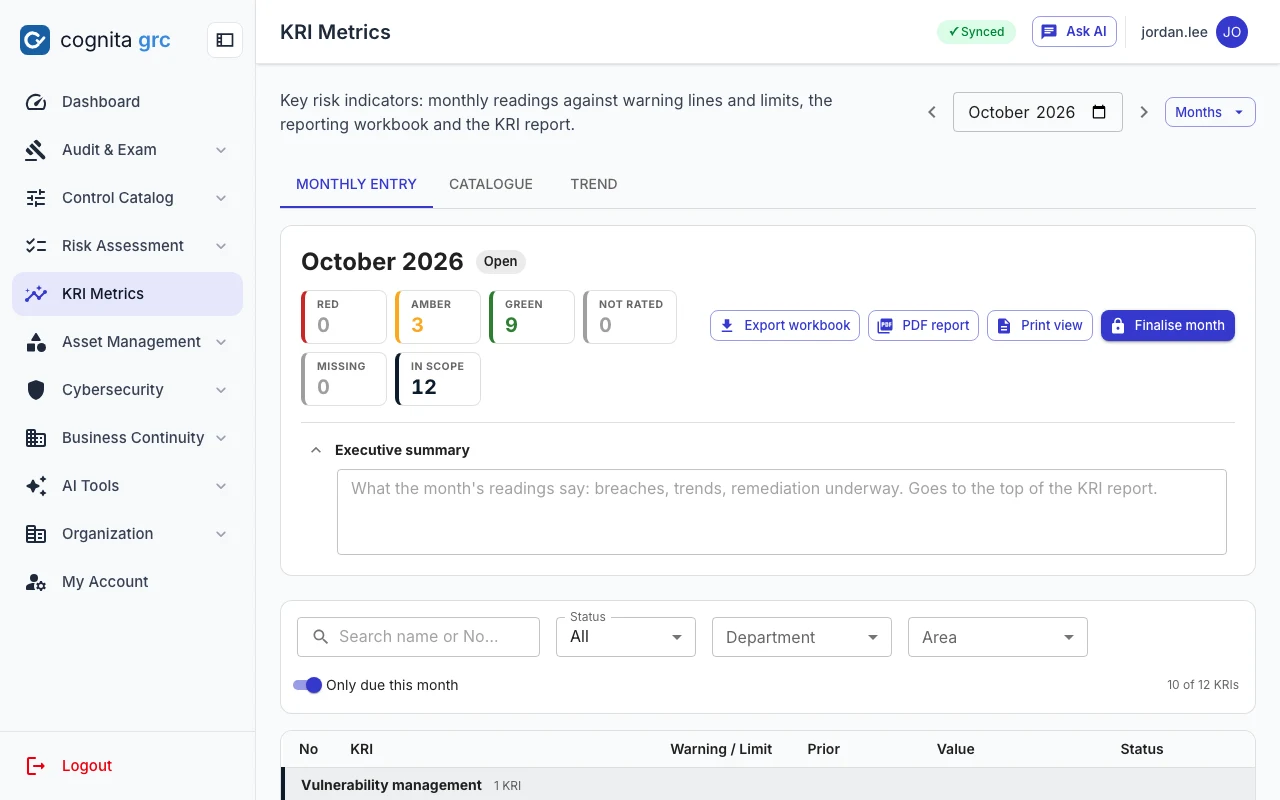
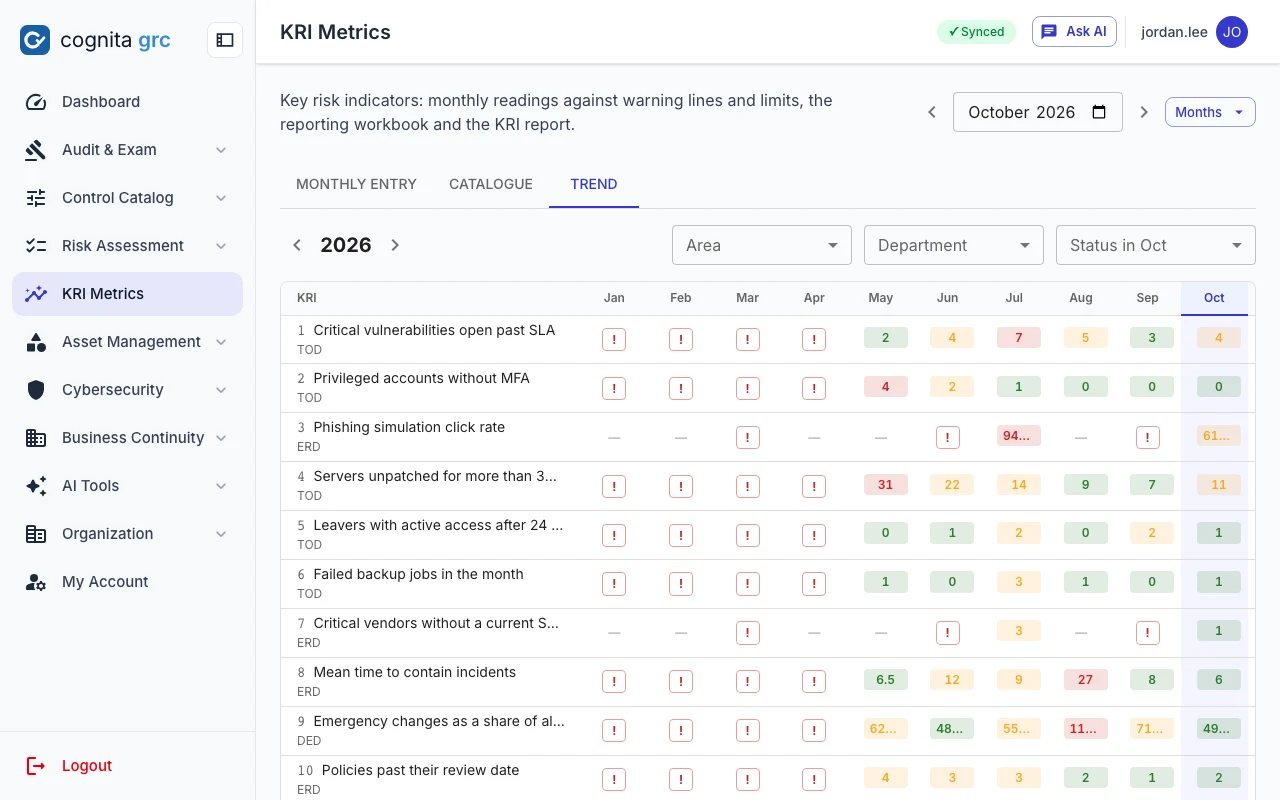
Every key risk indicator carries its formula, department, frequency, direction and two thresholds. Each month the readings are entered or imported from the reporting workbook; at or beyond the limit the indicator turns red, past the warning amber, otherwise green, and a breach asks for its root cause and remediation on the spot.

/kris
KRI monthly entry for October 2026 with red, amber, green and missing counts, an executive summary box and the indicators due this month
Monthly entry: what is red, amber, green or still missing this month, with the indicators due now listed below.
/kris · Trend
KRI trend view: twelve months of readings per indicator, each month coloured by its status
Trend: a year of readings per indicator, each month coloured by the status it earned.
  • CatalogueERM number, scope, metrics area, formula, owner department, frequency and reporting months. Quarterly indicators are due only in their months.
  • Monthly entryA value or a text reading, with the denominator where the formula is a ratio. Any breach records root cause, remediation, the responsible department and a due date.
  • Workbook round tripDownload the month's reporting workbook, fill it offline and import it back; the server re-checks every value and lists what it refused.
  • Month-endAn executive summary, a PDF report and a print view per month; a finalised month locks its readings.
Asset Management

Know what you run, who can reach it, and where its data goes.

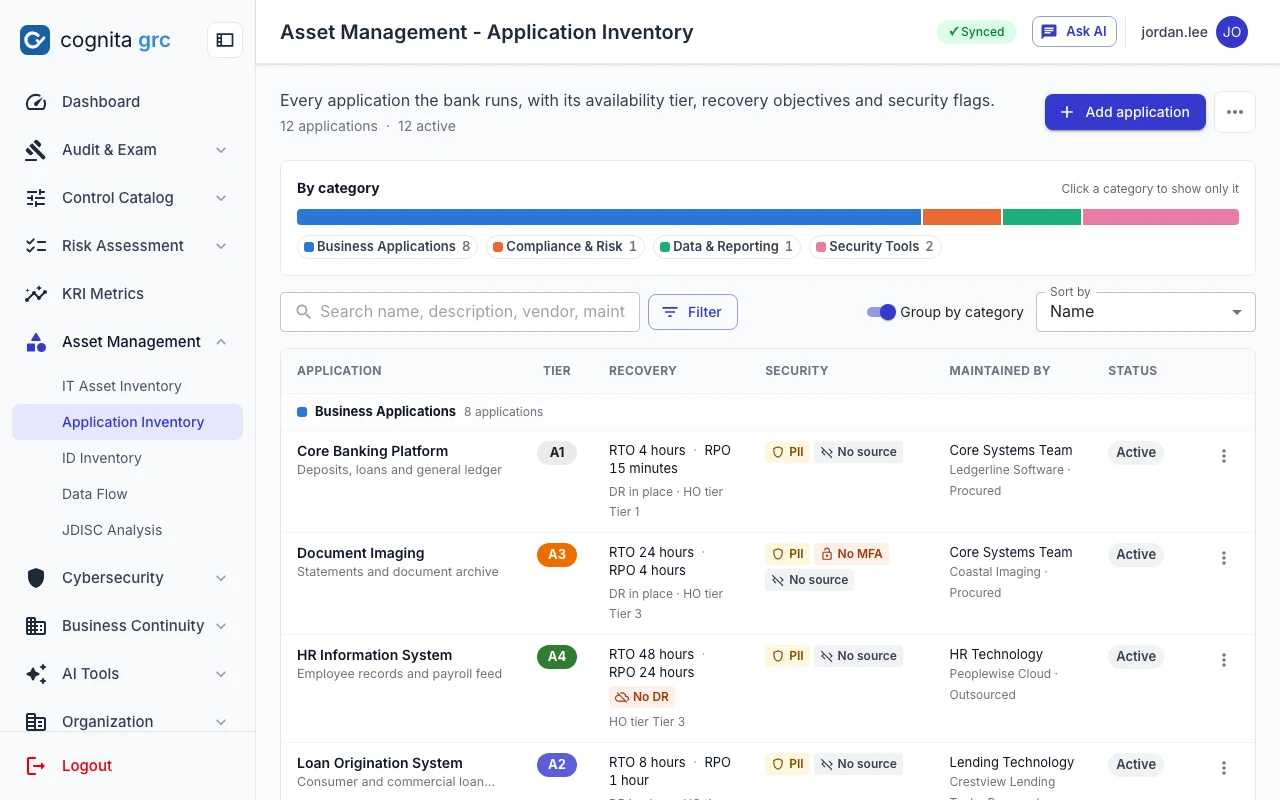
/id-governance/application-inventory
Application inventory grouped by category under a category bar, each row with availability tier, recovery, security attention tags, maintainer and status
The application inventory is the register that identities, data flows and continuity plans hang from. Grouped by category, recovery and security read at a glance; a row opens the full record.
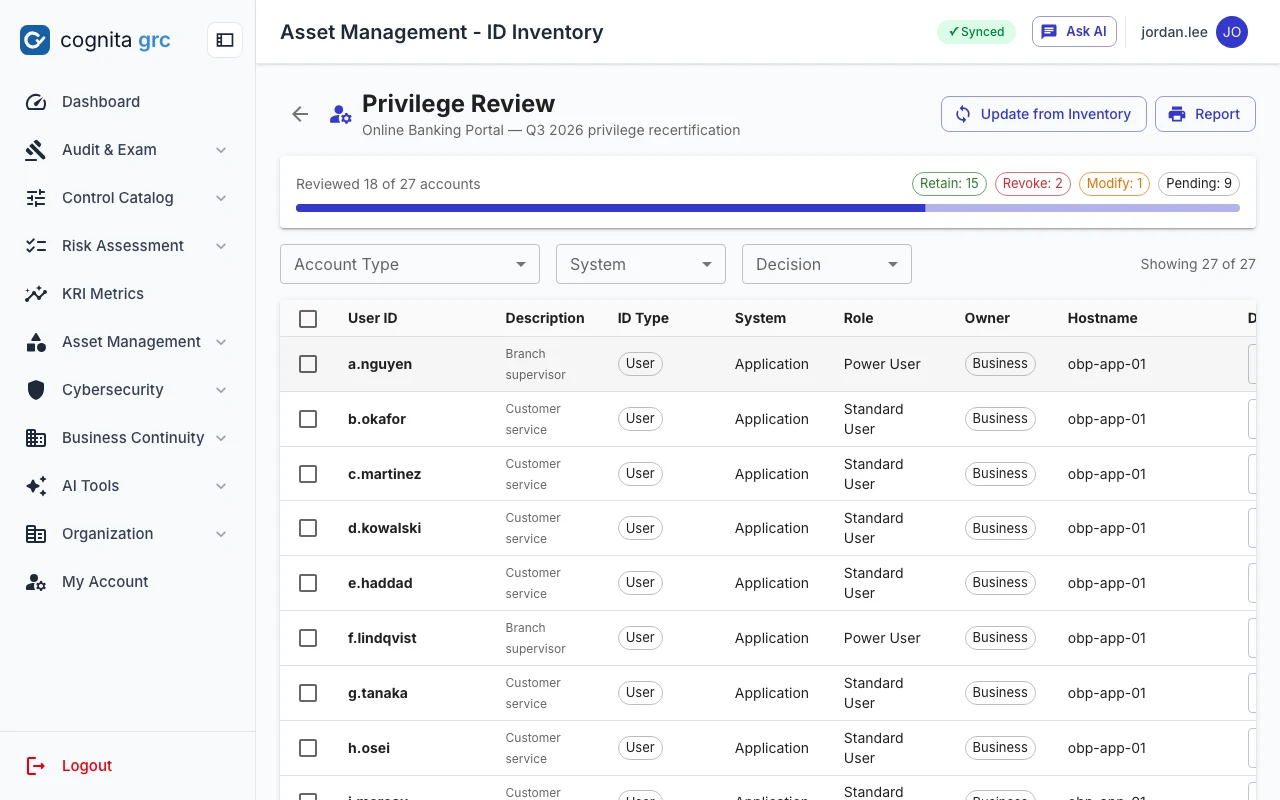
/id-governance/id-inventory/…/privilege-review
Privilege review in progress: 18 of 27 accounts reviewed, with retain, revoke, modify and pending counts
A privilege review snapshots every account when it starts, so a completed review stays an accurate point-in-time record.
  • IT asset inventoryStays fast at thousands of rows with server-side paging, filtering and sorting. Excel import updates in place by serial number.
  • ID inventory and privilege reviewAccounts per application with ID type and entitlement role kept separate. Retain, Revoke or Modify decisions, and one consolidated action report across applications. AI
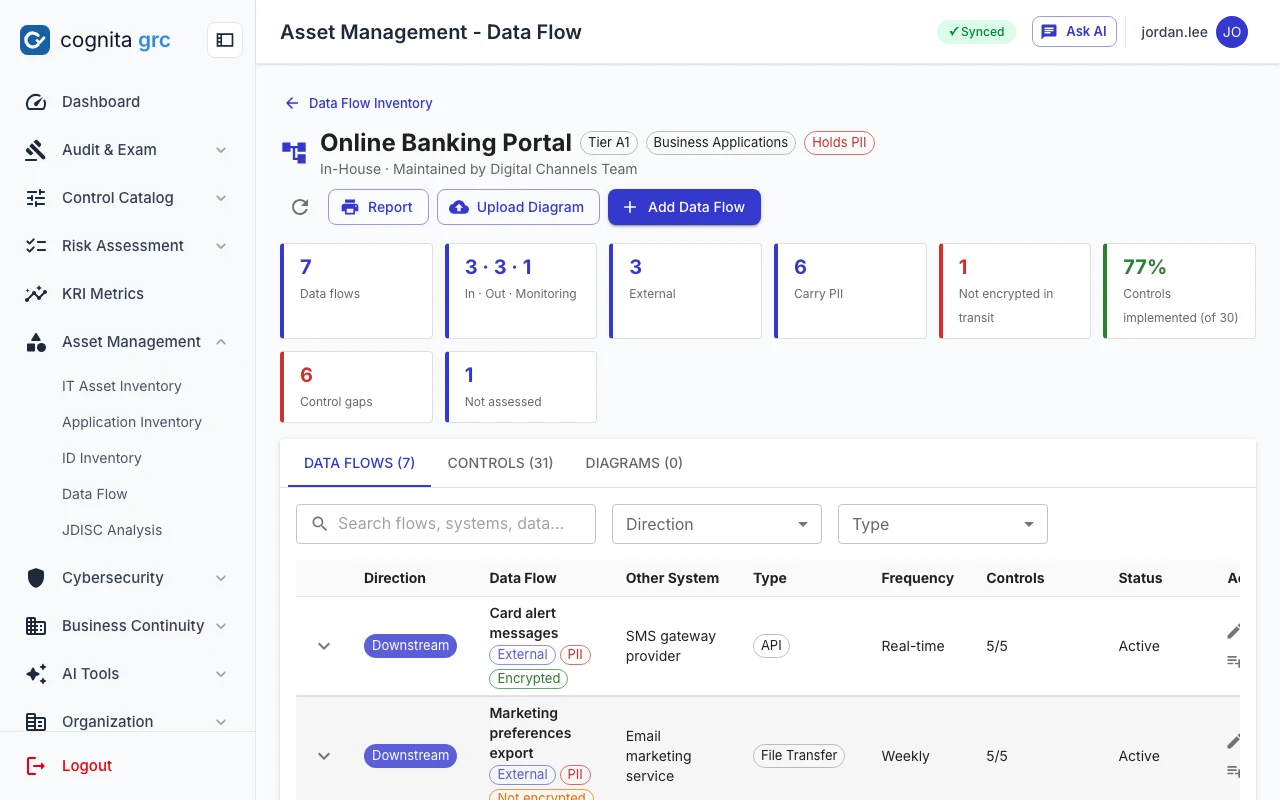
  • Data flowsDirection, counterparty, transport, PII and encryption for every flow, with the data movement control library copied onto each one. AI proposes flows from a diagram; nothing saves until you confirm. AI
  • Software discovery analysisMatch a discovery export against the approved software catalogue with rules first and AI for the rest. AI
/asset-management/data-flows/2
Data flows of one application with external, PII and encryption tags and control coverage
Flows for one application: 77% of its data movement controls implemented, and the gaps counted.
Cybersecurity

Security tool output, triaged and reported.

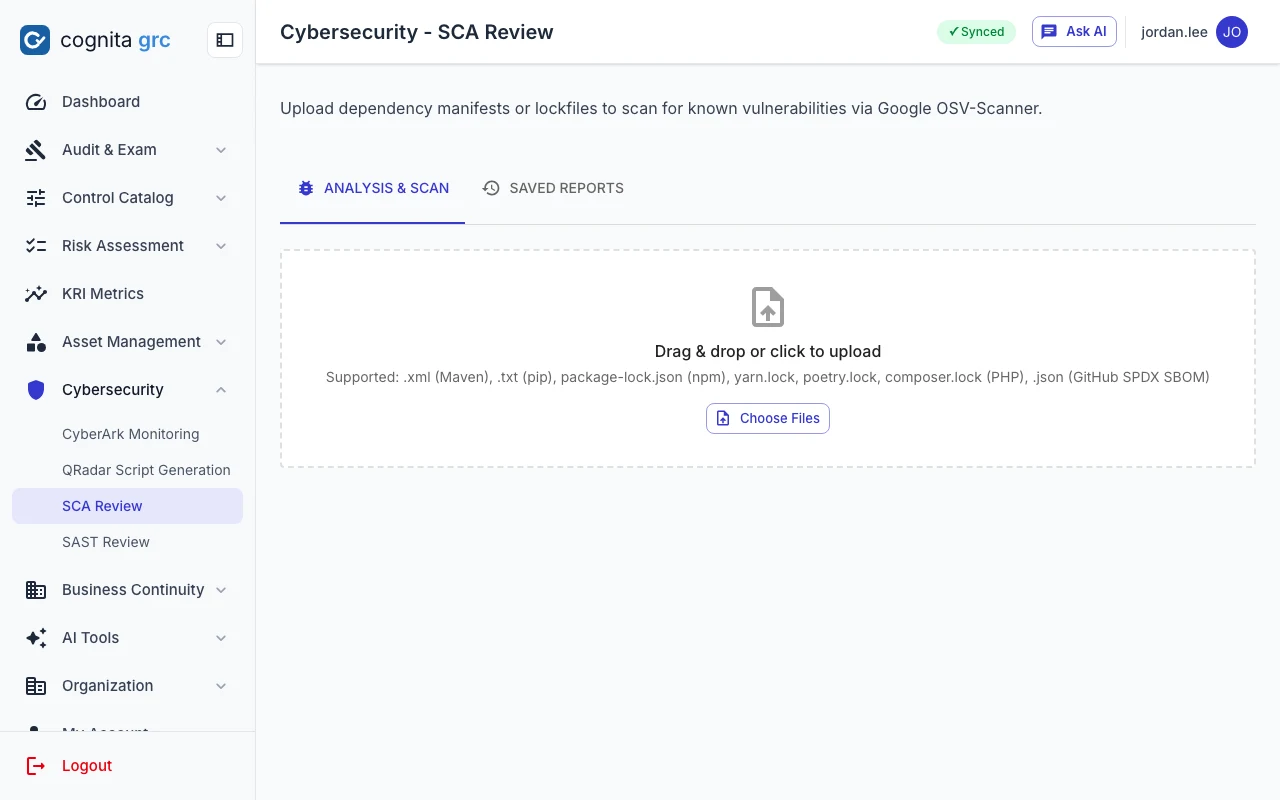
  • SCA review. Manifests, lockfiles or an SPDX SBOM scanned with Google OSV-Scanner; AI triages the critical and high findings, checked against CISA KEV. AI
  • SAST review. A Checkmarx export summarised with recommendations and a metrics dashboard in the PDF. AI
  • Privileged access monitoring. Four report types from the vault, analysed by rule: requests without a reason, self-approvals, emergency access, manual resets.
/ai-tools/sca-agent
SCA review upload area accepting Maven, pip, npm, yarn, poetry and composer lockfiles or an SPDX SBOM
Business continuity

Impact analysis per department, and incident response plans you can actually run.

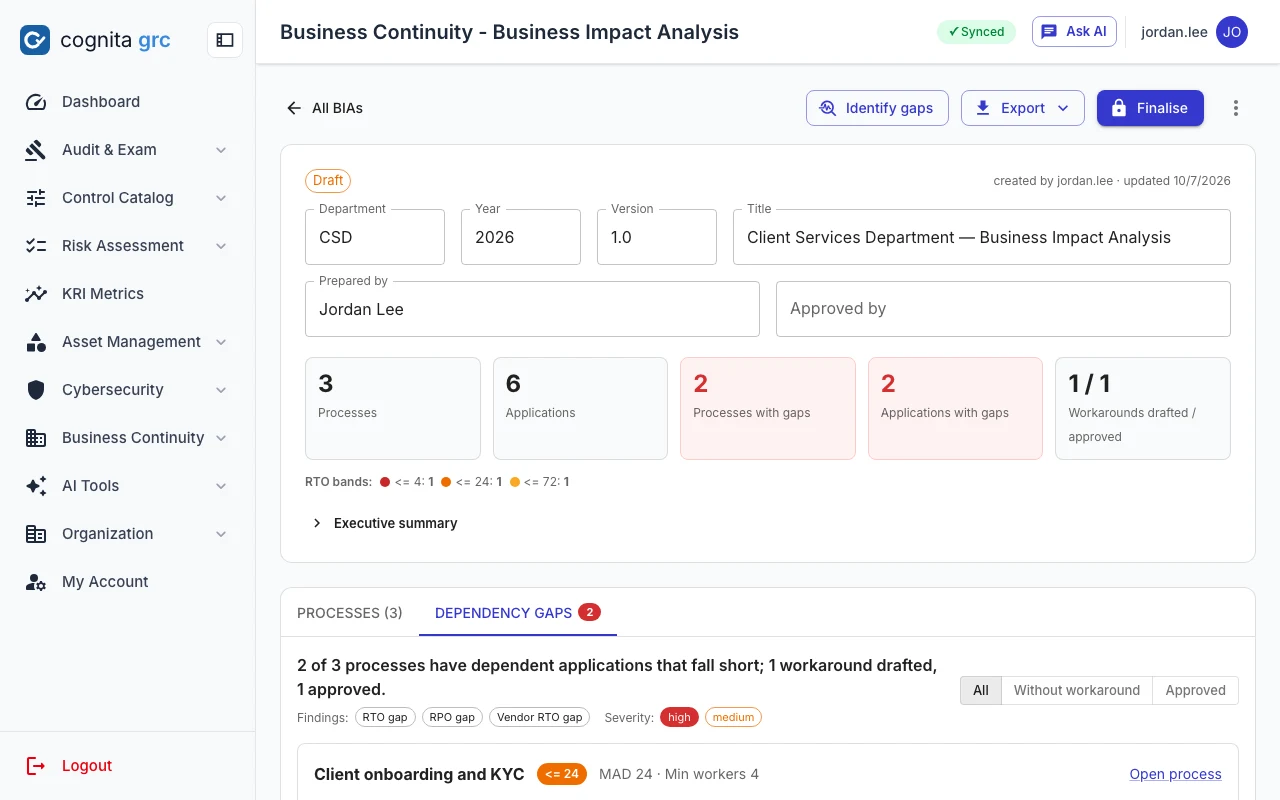
Each department keeps one business impact analysis a year: its processes, how long each can be down, the loss-impact grid over time, and every application and vendor it depends on. The platform then checks whether those dependencies can keep up, and holds one incident response plan per scenario the data centre may face.

/bcm/bia/… · Dependency gaps
A department BIA with counts of processes, applications and gaps, and the dependency gaps tab listing a process whose application falls short
A dependency gap: an application whose RTO or RPO is longer than its process allows, or a vendor slower than the process. The workaround for it is drafted by AI from the process's own record and approved by a person.
  • Department BIAsOne per department and year, imported from the department's workbook or built process by process, with MAD, RTO, minimum staff, peak periods, vital records and upstream and downstream dependencies.
  • Dependency gapsJudged on read from the figures, never stored, so changing an RTO changes the finding at once. Workarounds carry a status from draft to approved. AI
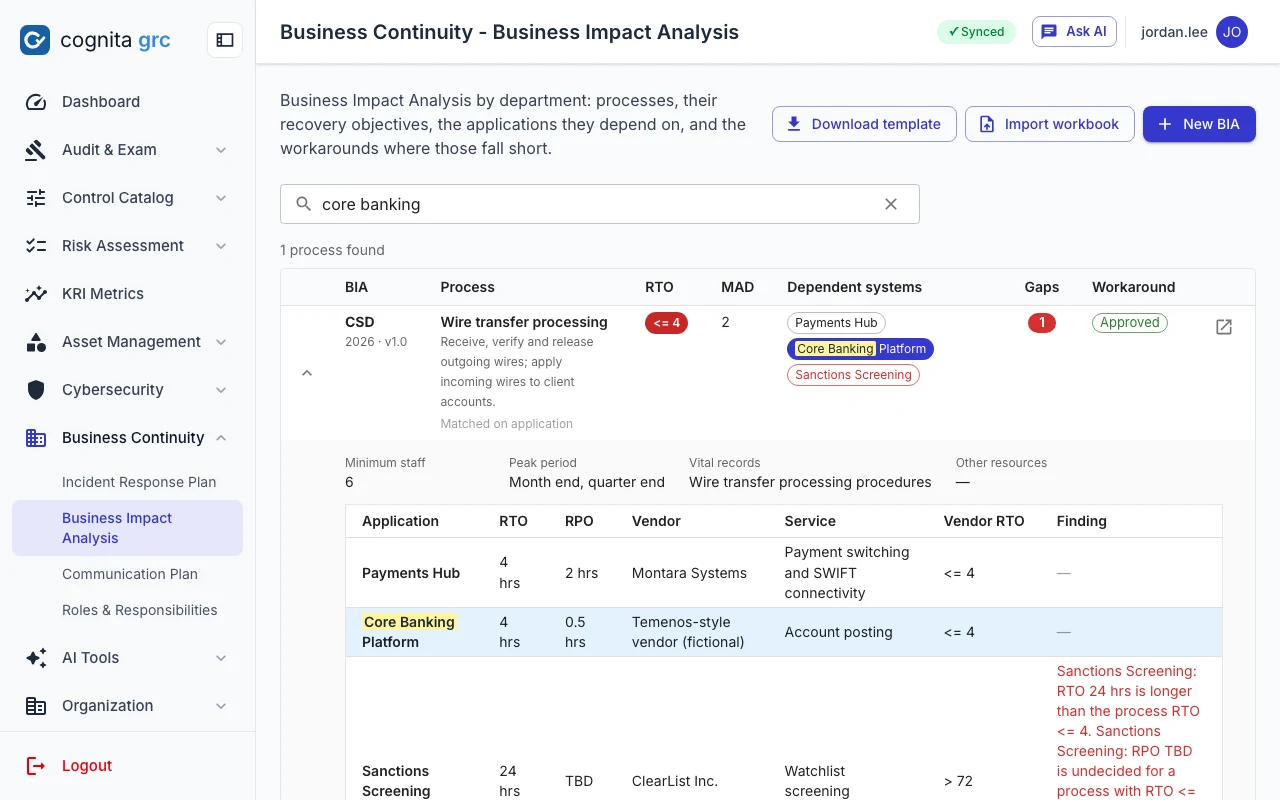
  • Search across BIAsFind a process by name, or every process that depends on a given application or vendor, with the gap findings shown on the spot.
  • ReportsThe BIA and the workaround register as PDF, and the workbook back in the shape it came in.
/bcm/bia?q=core banking
Search results across BIAs for an application name, showing the process that depends on it, its dependent systems and gap findings
Which processes depend on an application, across every department's BIA.
/bcm/dr-plan/…
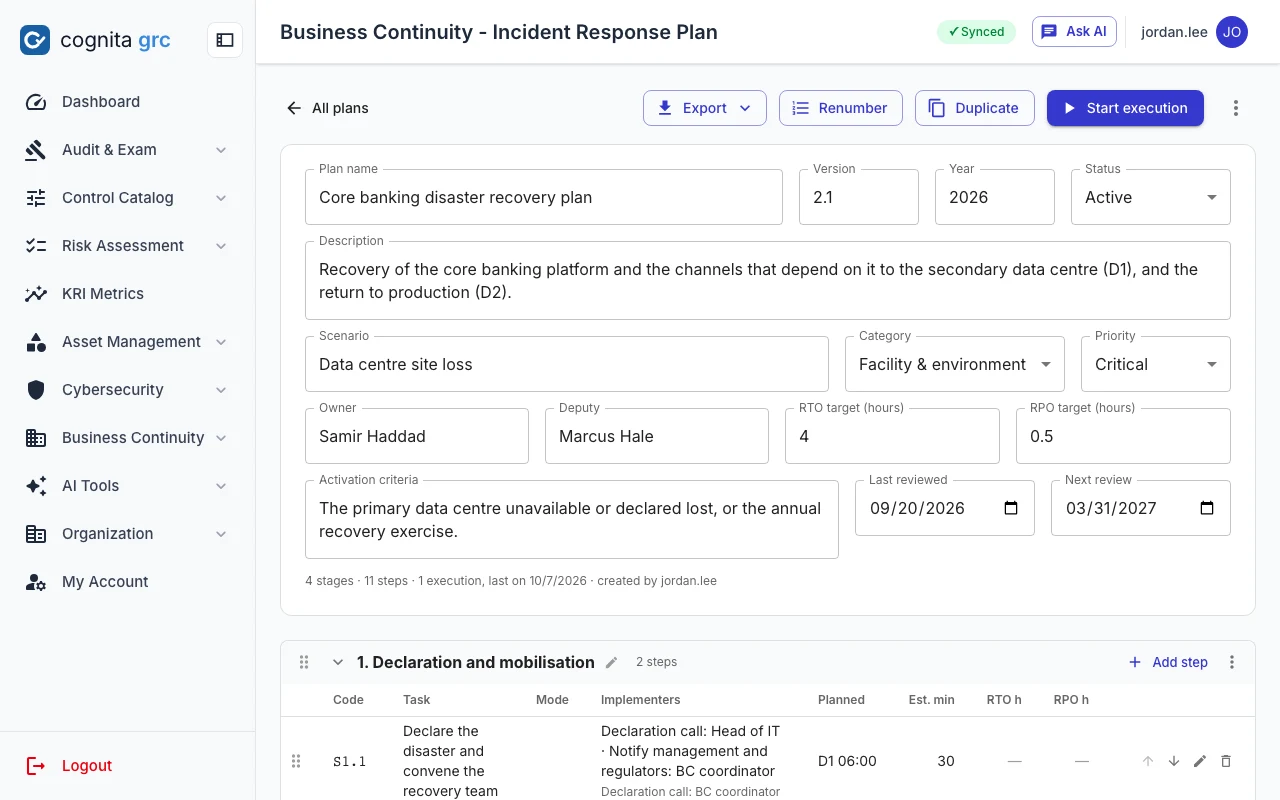
An incident response plan with its scenario, owner, targets and review dates in the header, and stages of steps anchored to D1 and D2 with their implementers
A plan's runbook: stages and steps anchored to the disaster (D1) or the return to production (D2), each with activities and the people who carry them out.

One plan per scenario, with the people already on it

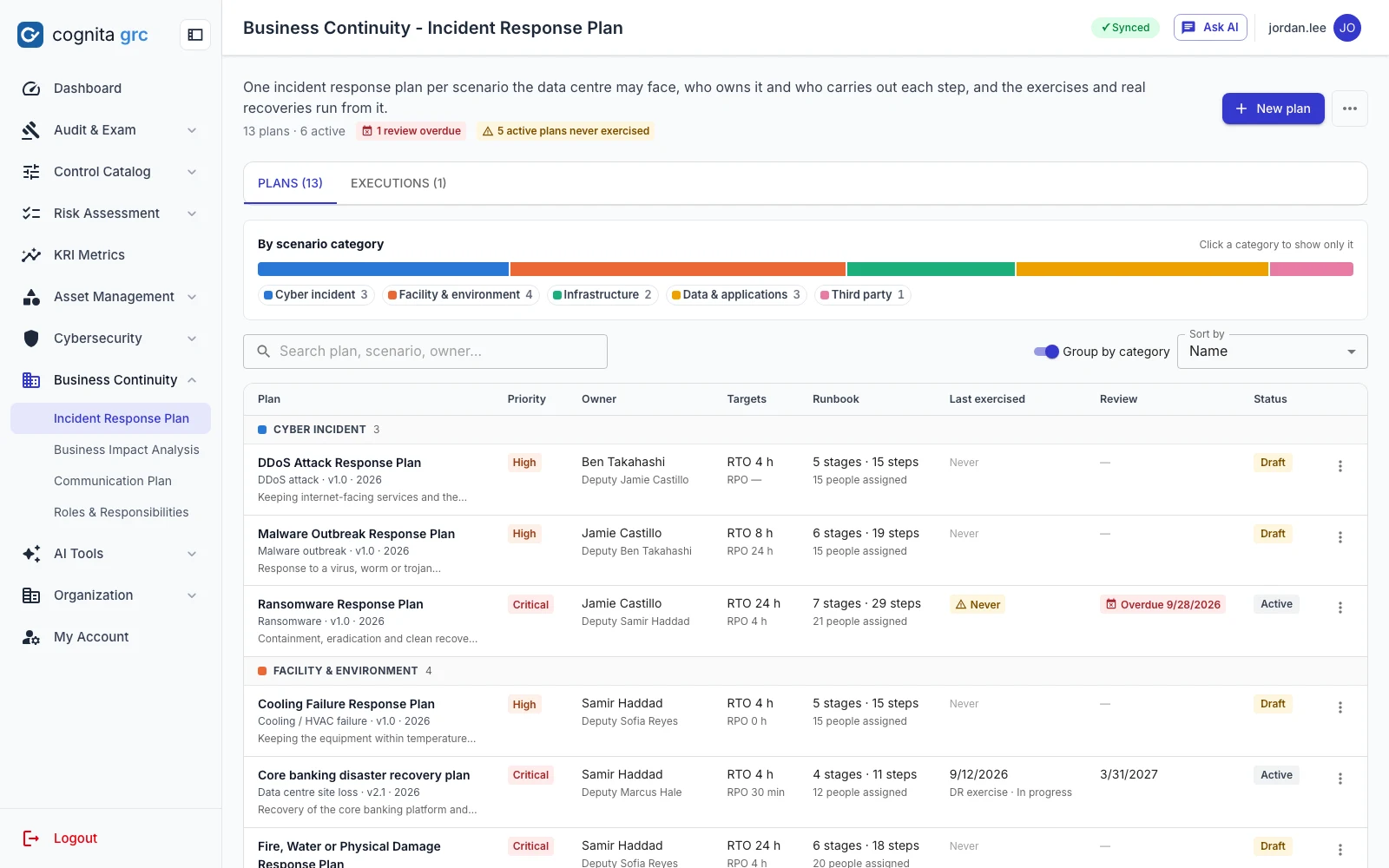
The inventory holds a plan for each kind of incident the data centre may face. Every plan names its scenario and category, an owner and deputy from the org chart, its RTO and RPO targets, the condition that activates it and when it is next due a review. Overdue reviews and active plans never exercised are flagged on the list.

  • A catalogue of twelve scenarios: ransomware, malware, DDoS, power outage, cooling failure, fire or water damage, hardware failure, network outage, core application outage, database corruption, backup failure and a third-party outage
  • Steps are assigned by team: the team lead becomes the primary implementer and the members the secondary ones, department heads and the General Manager by role
  • Add the whole standard set in one click, then tune each plan on its board
/bcm/dr-plan
Incident response plan inventory grouped by scenario category under a category bar, each row with priority, owner, RTO and RPO targets, runbook size, last exercise, review date and status
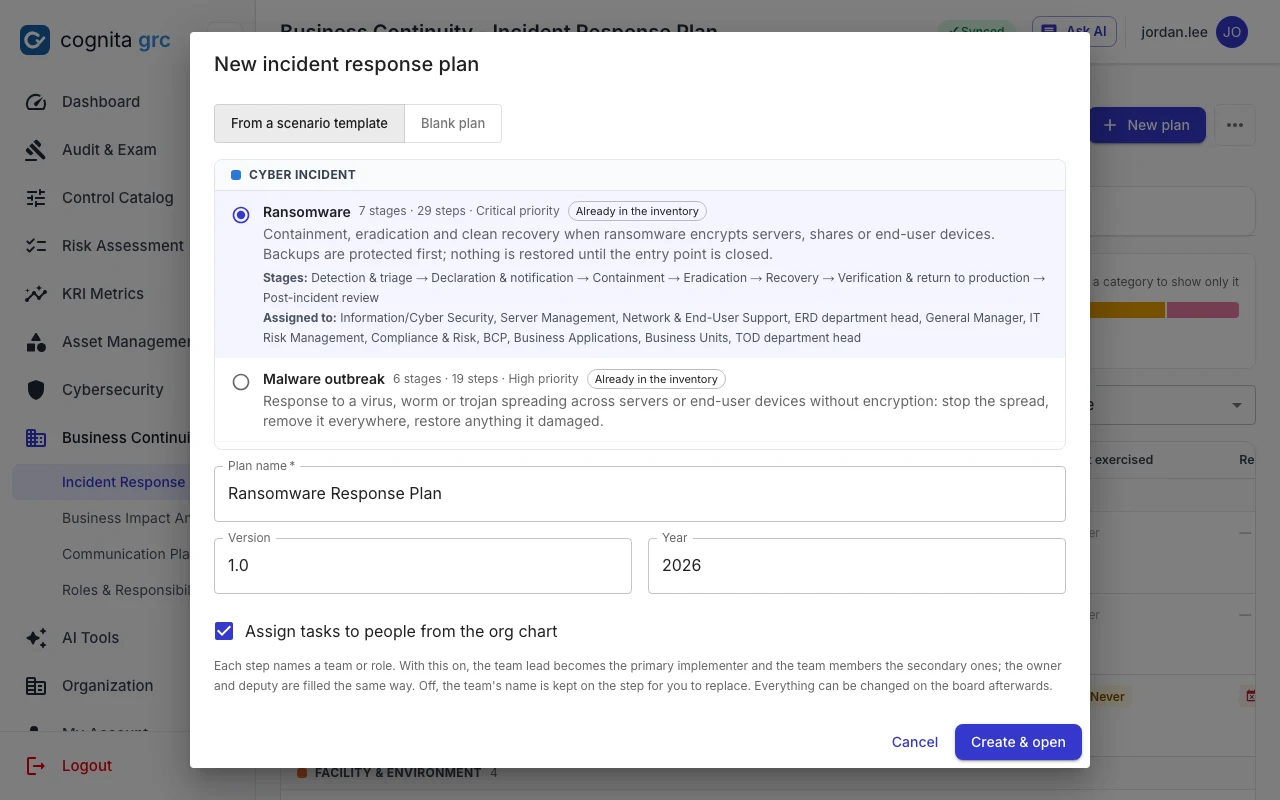
/bcm/dr-plan · New plan
The new plan dialog listing the scenario templates by category, with the ransomware template selected and its stages and assigned teams shown
A new plan starts from a scenario template or from nothing. With a template, the stages and the teams each step goes to are shown before the plan is created.

Exercises with the clock running

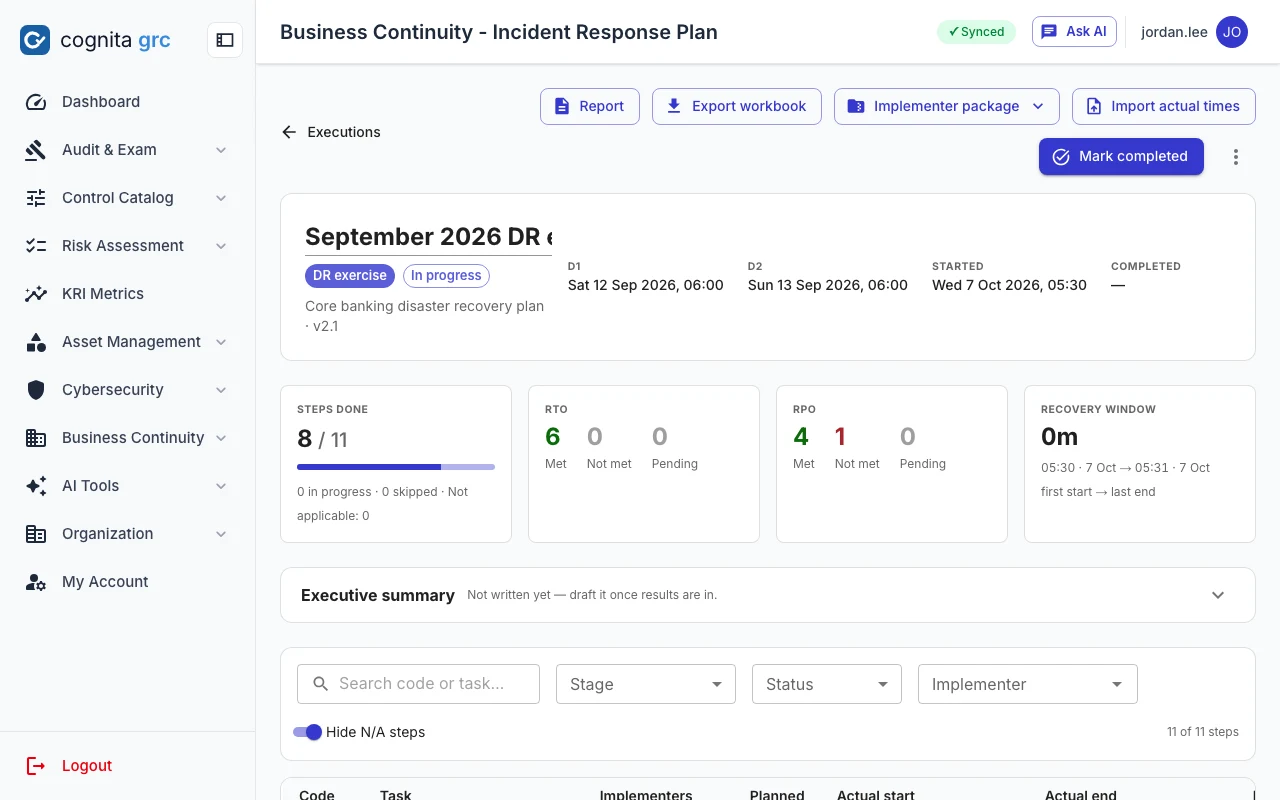
Start an exercise, or a real recovery, from any plan. Every activity records who did it and when; every step records whether its RPO was met and what was observed. The report and the executive summary come from those times, not from memory. AI

  • Implementer packages: each team's steps as a workbook, with actual times imported back
  • Steps done, RTO and RPO met or missed, and the recovery window, counted live
  • Roles and responsibilities and the communication plan beside the plans
/bcm/dr-plan/executions/…
An exercise in progress: steps done, RTO and RPO met or not met, the recovery window, and the step table with actual start and end times
AI tools

About thirty AI actions, one server-side switch.

Every AI request passes through one service that checks the platform-wide switch first, so turning AI off covers cloud and local models and direct API calls alike. Running an AI tool is open to every role; saving its result is an ordinary change that needs edit rights.

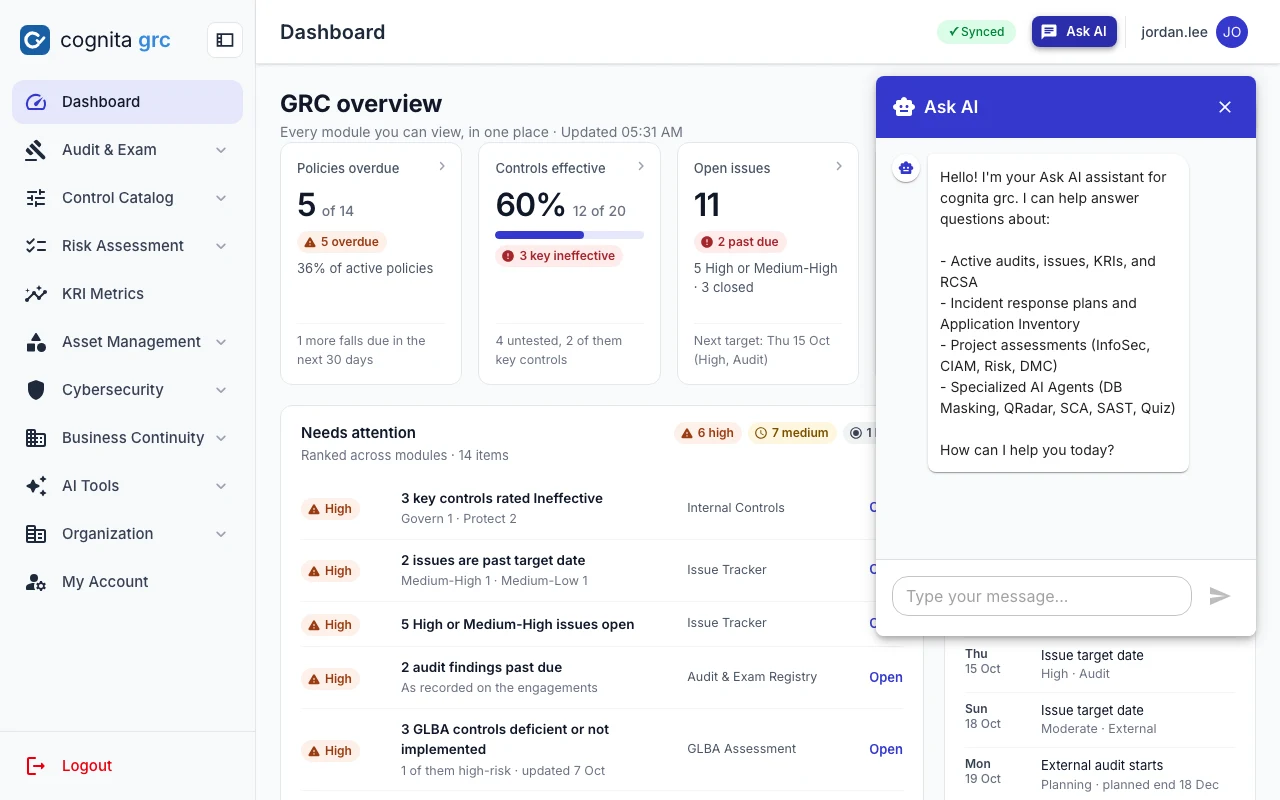
/ · Ask AI
Ask AI assistant panel open beside the GRC overview
Ask AI knows the modules you can open and their current counts. No text typed into a record reaches its prompt, and links to outside sites are stripped.
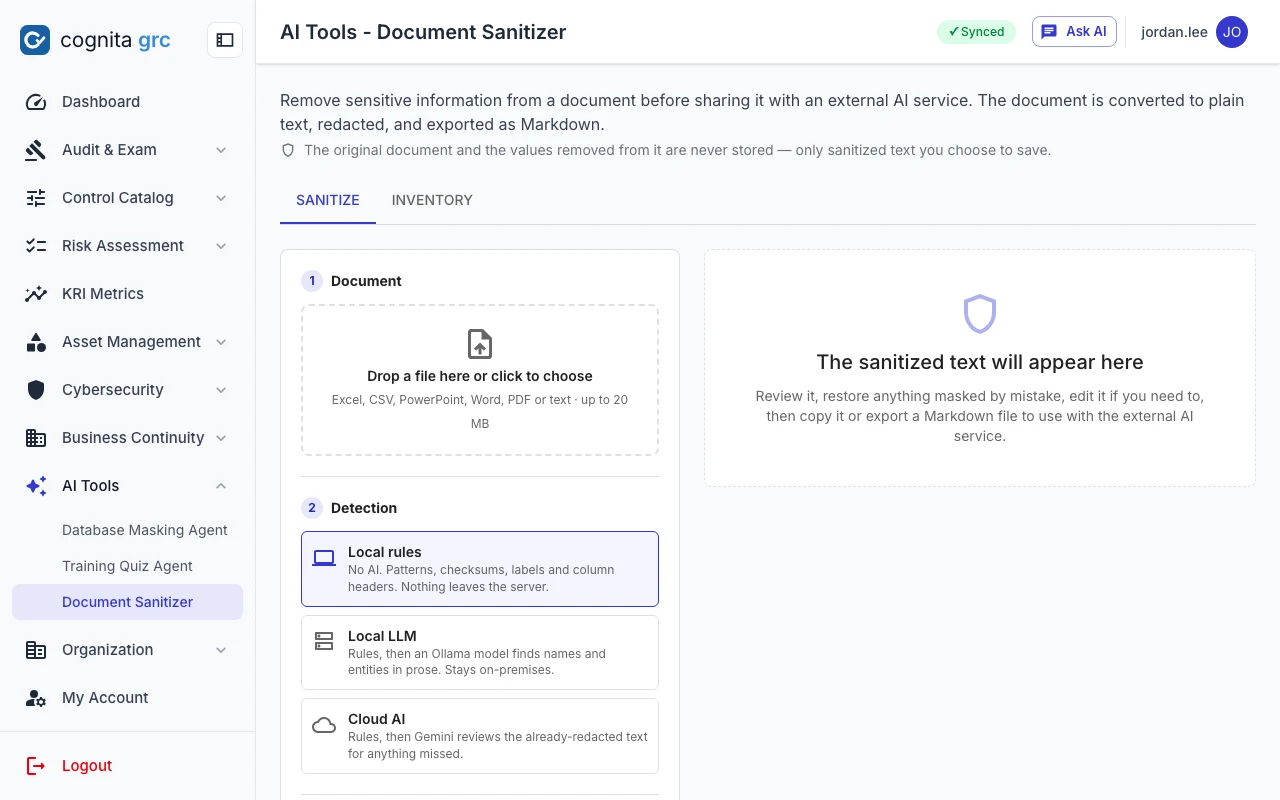
/ai-tools/document-sanitizer
Document Sanitizer page with its upload area and the list of what gets replaced before a document reaches a cloud model
Document Sanitizer replaces names, phone numbers, addresses, host names and your own shared terms with stand-ins before a document leaves the building; the names come back in the answer.
  • Document SanitizerSanitized copies of evidence for cloud models: people, phones, addresses, IP addresses and host names on your corporate domains swapped for consistent stand-ins, with a glossary of terms your institution adds.
  • Database masking agentScan a schema for personal data across 14 categories and generate T-SQL masking scripts.
  • Training quiz agentTurn a policy PDF into a 15-question multiple-choice quiz.
  • Rewrites and summariesRewrite concerns, observations and action items field by field, and draft executive summaries from assessment results.
  • Model choice, allowlistedGoogle Gemini, or a model served on your own GPU with Ollama or vLLM that keeps prompts on your own hardware. Administrators keep the list of models the platform may call; each person picks a default from it, and every call is metered by user and model.
Sign-in

Your directory, your identity provider, or a password with an authenticator.

Register the providers your institution already runs and people sign in the way they sign in everywhere else. Accounts can be created on first sign-in, with roles taken from directory groups, so nobody keys in a user list by hand.

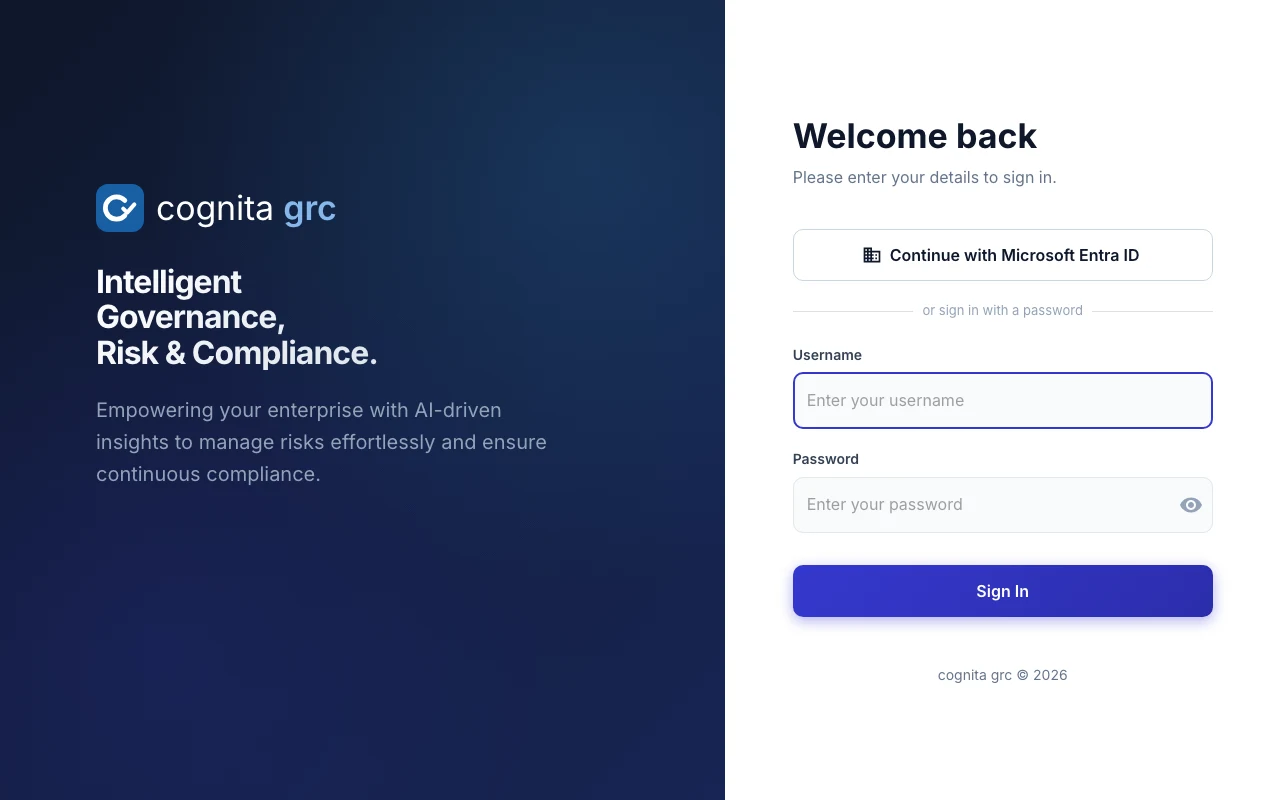
/login
Sign-in page with a Continue with Microsoft Entra ID button above the username and password form
Single sign-on buttons appear for each provider that is on; the password form stays for local and directory accounts, or for administrators only.
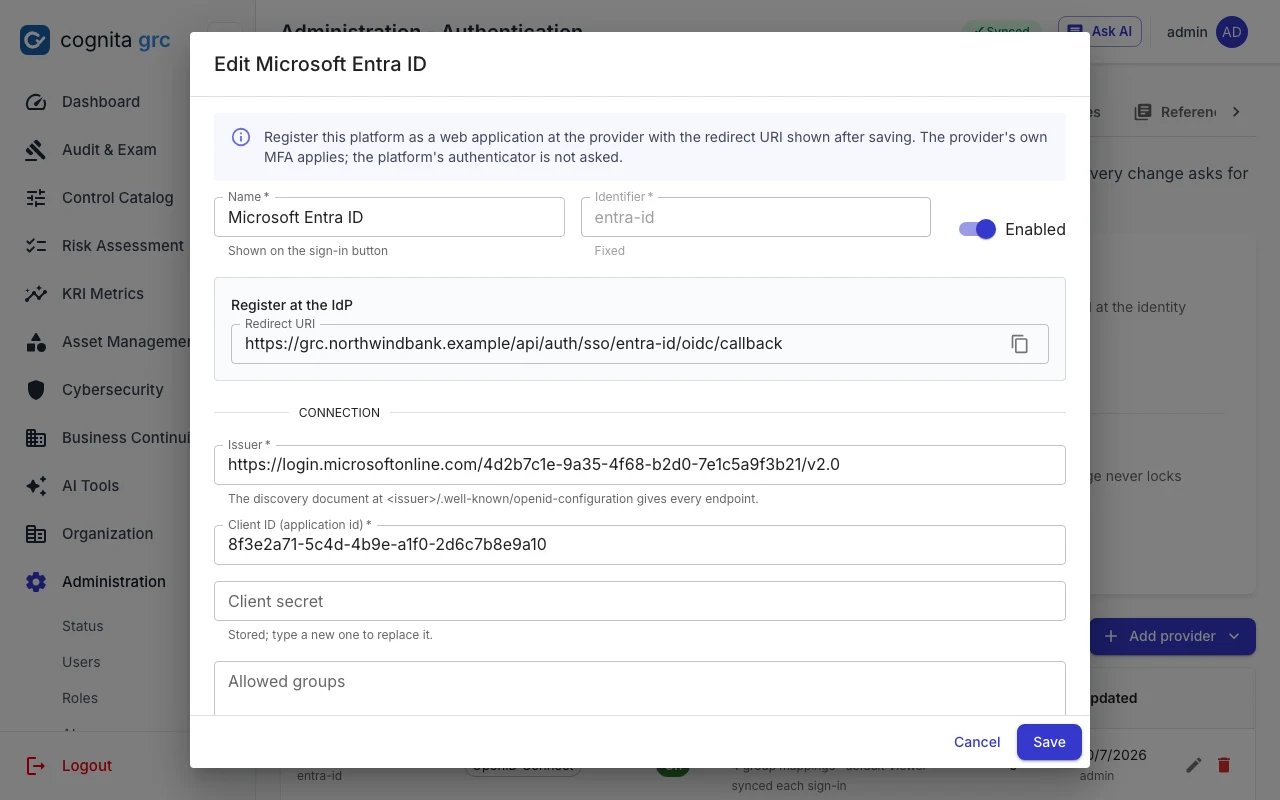
/admin/authentication
Editing an OpenID Connect provider: the redirect URI to register at the identity provider, issuer, client id and stored client secret
A provider: the reply address to register at the IdP, the connection, the groups that grant each role, and a test before it is turned on.
  • LDAP and Active DirectoryThe password form, checked by binding to the directory over LDAPS or StartTLS; nested groups and allowed-group filters; the platform's own authenticator still applies.
  • SAML 2.0 and OpenID ConnectMicrosoft Entra ID and any standards-based IdP. Signed assertions and ID tokens checked for issuer, audience, validity and replay; the provider's MFA applies.
  • Groups to rolesEach provider maps directory groups to roles and names a default; roles can follow the directory at every sign-in. Secrets are encrypted at rest and never shown again.
  • Break-glassPassword sign-in can be limited to administrators once single sign-on is in place, and administrators are always allowed in, so a provider outage never locks everyone out.
Administration

Everything set for the whole platform, in one place.

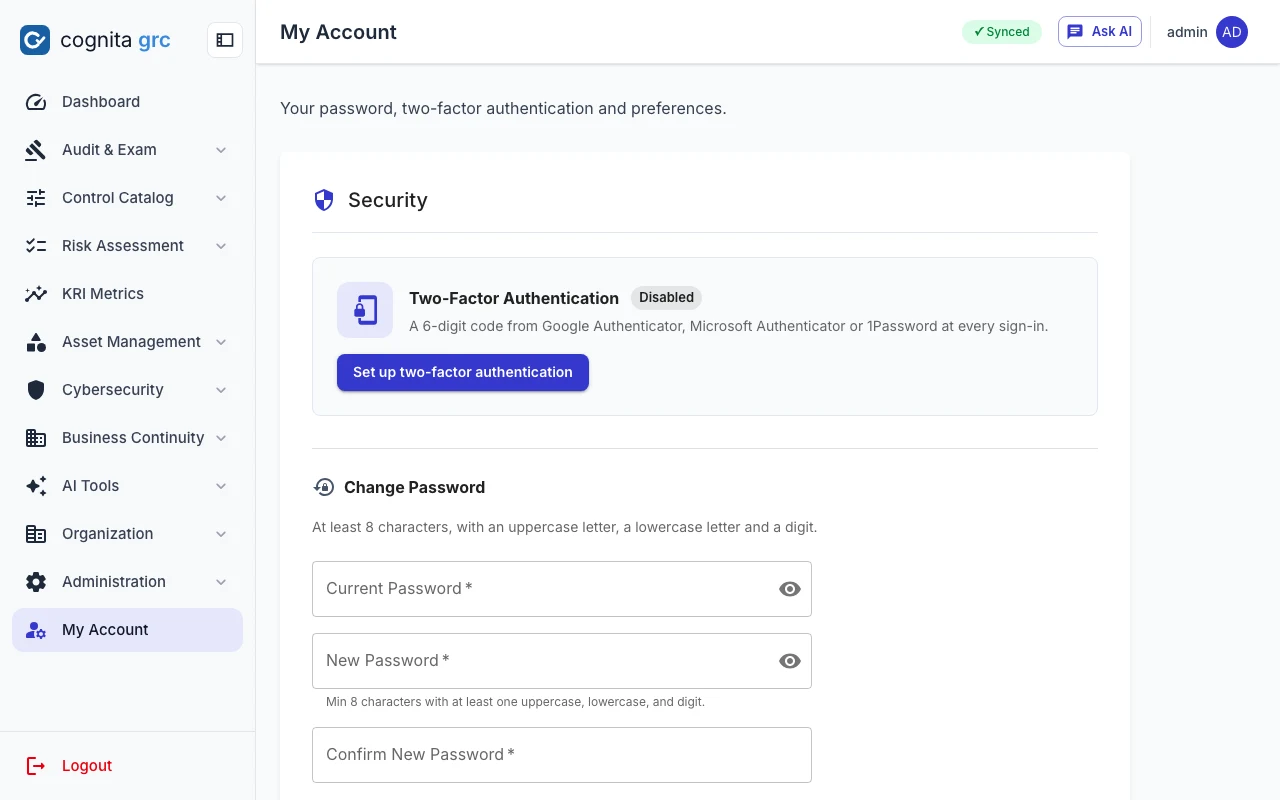
Administration is a row of tabs: Status, Users, Roles, AI, Security, Authentication, Templates, Backups and Logging. Each sits behind the platform permission its API checks, so an auditor can be given the audit trail without the keys to anything else. My Account, for everyone, holds their own password, authenticator, sessions and preferences.

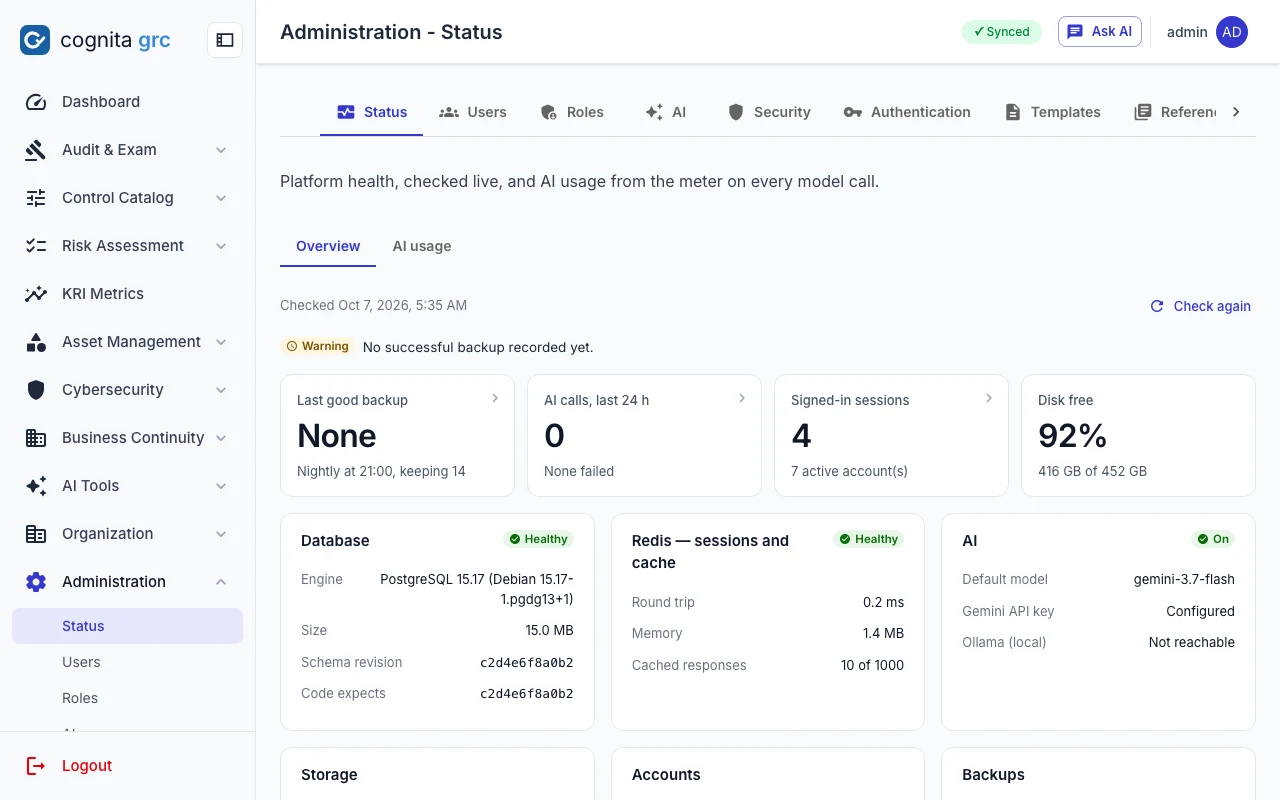
/admin/status
Administration status page with last backup, AI calls in the last 24 hours, signed-in sessions, disk free, and database, Redis and AI health cards
Status, checked live: database, Redis and AI health, the last good backup, signed-in sessions and disk, with AI usage by day and by user on the next tab.
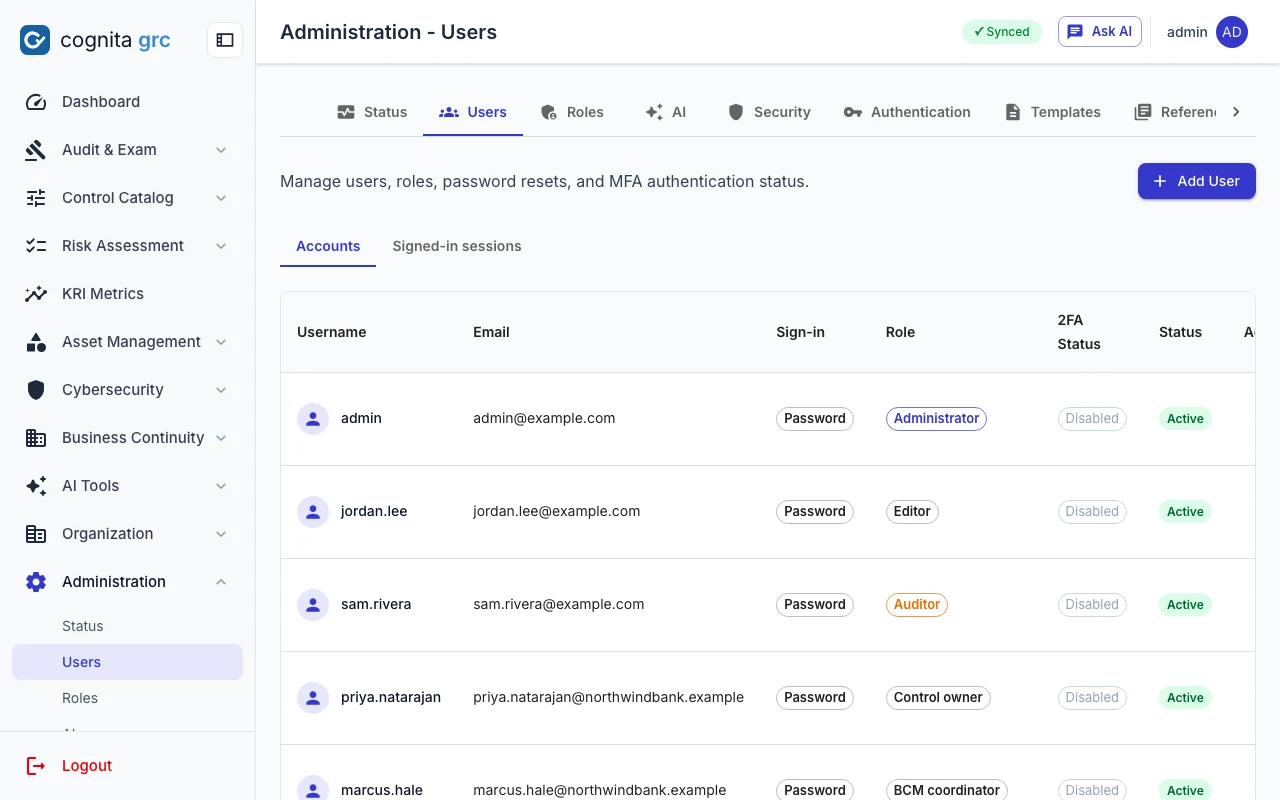
/admin/users
User accounts with e-mail, how each signs in, the roles held, two-factor status and active state
Accounts, how each signs in, the roles it holds and its authenticator status; a second tab lists every signed-in browser and can end it.
  • Security policyLockout, session lifetimes, authenticator tries and password length are settings with a floor the platform will not go below. Saving one asks for the administrator's password again and is audit-logged old → new.
  • SessionsEvery sign-in is one session: see them, end one, or end all others, from My Account or Administration. Ending a session signs that browser out within the minute.
  • Backups and statusNightly snapshots on a schedule, each run recorded with its verified row counts, and a status page that checks the stack live.
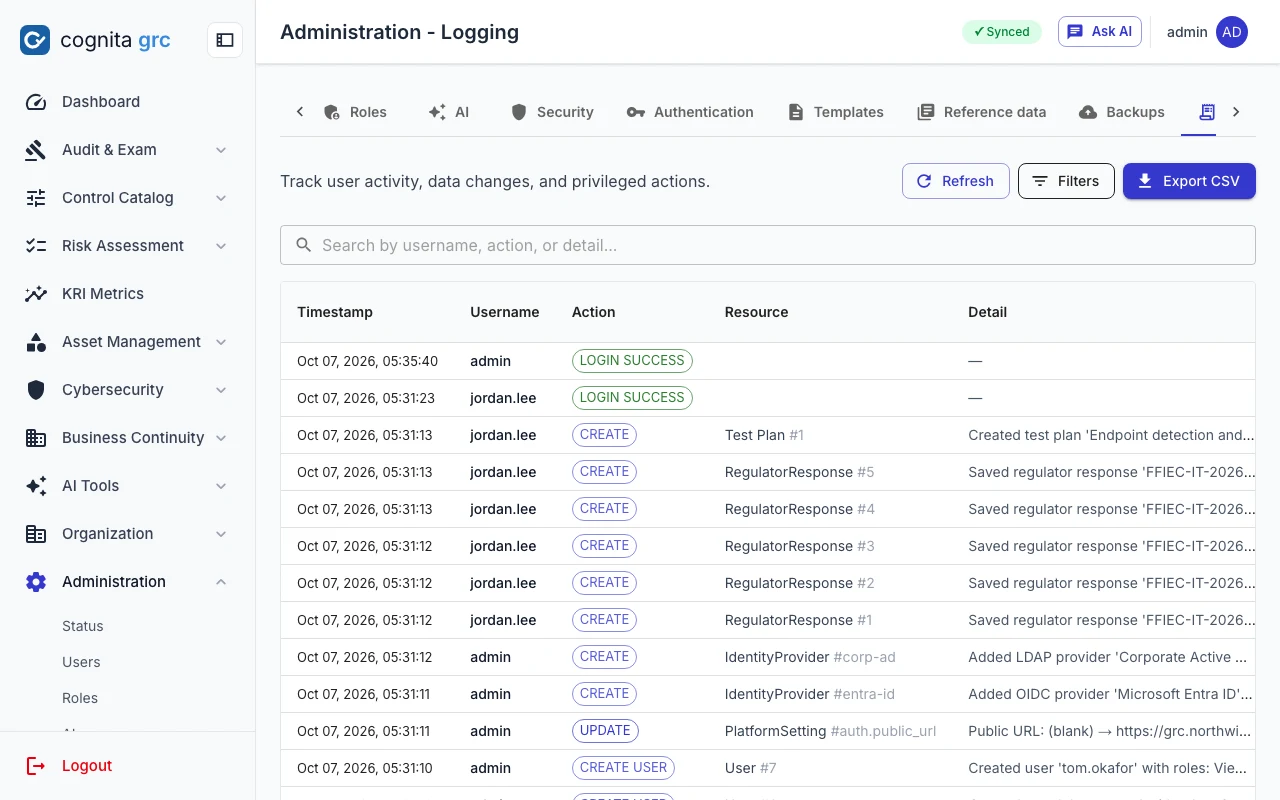
  • Audit trail and File VaultSign-ins and failures, changes written as old → new, imports, exports and AI actions, searchable and exportable; plus a private file store only the uploader can open.
/admin/logging
Audit log listing sign-ins, creates and updates with user, resource and detail
/account
My Account with two-factor authentication setup, password change, signed-in sessions and the AI model preference
Roles and permissions

View or edit, per module, in roles you define.

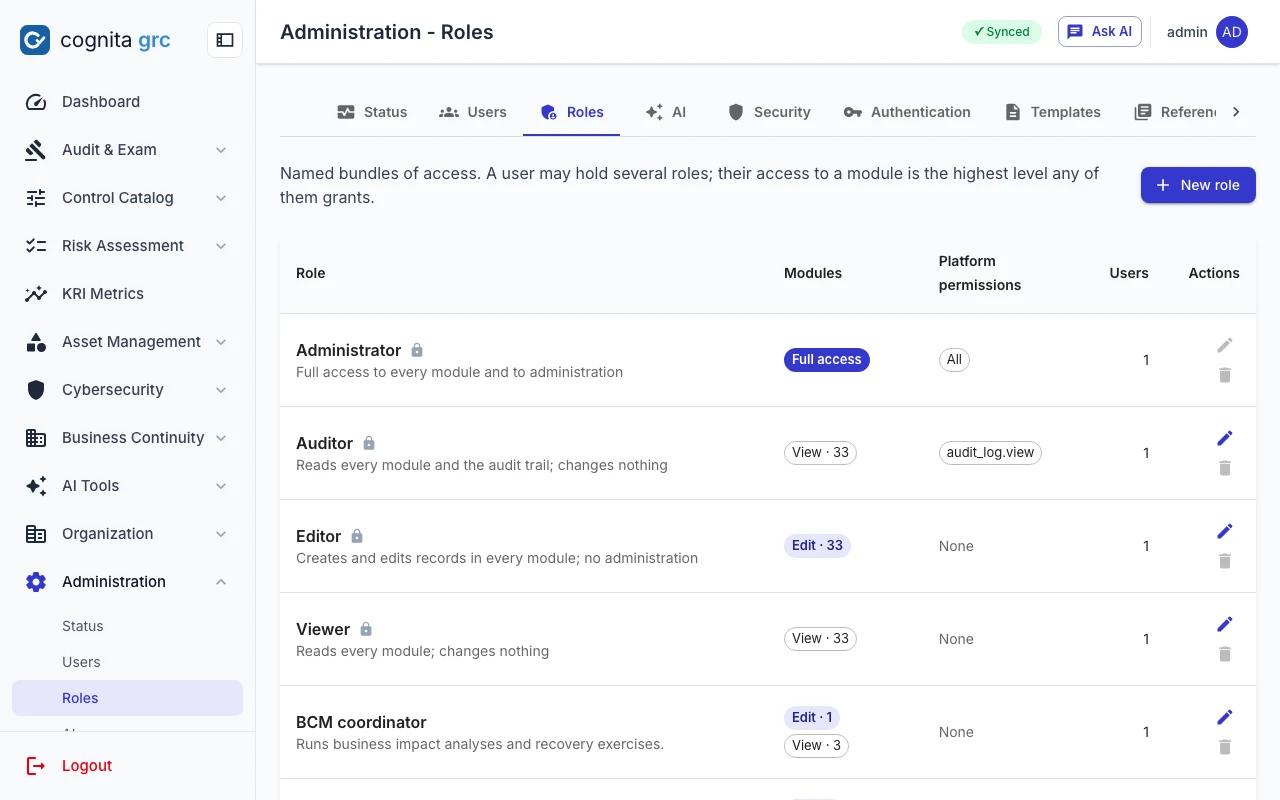
A role grants a level on each of the 33 modules and any platform permissions — manage users, manage roles, platform settings, read the audit trail, compliance reference data. A person may hold several roles; their access is the highest any of them grants. Four built-in roles ship with the platform and reproduce the fixed roles below.

/admin/roles
Roles page listing Administrator, Auditor, Editor and Viewer with their module levels and platform permissions, followed by custom roles such as BCM coordinator
The built-in roles beside the ones an administrator added: a control owner who edits only controls and policies, a BCM coordinator, a compliance analyst with the audit trail.
CapabilityAdminEditorAuditorViewer
Read records, print and export✓✓✓✓
Create, edit and delete records✓✓––
Run AI tools✓✓✓✓
Save or delete AI results✓✓––
Read the audit log✓–✓–
Users, settings, AI switch, backups✓–––

Every route of a module requires at least view access to it, and its writes require edit; the sidebar, the dashboard and Ask AI follow the same grants. The last active administrator can never be removed or demoted.

Quality attributes

Built to stay up, stay fast and stay honest.

  • PerformanceServer-side paging on the large registers, Redis caching invalidated on every change with non-blocking key sweeps, and pages loaded only when opened.
  • ResilienceIf Redis goes away the platform degrades instead of stopping: sessions survive, rate limiting falls back to in-process counting, lockout still applies at sign-in.
  • SecurityCookie-only sessions with silent refresh and revocation, indistinguishable failed sign-ins, rate limits, content-checked uploads, CSV formula escaping, and single sign-on replies checked for signature, audience and replay.
  • Tested guaranteesOver a thousand backend tests lock in the behaviours easiest to break: every router behind a session, the permission matrix, cookie-only tokens, Redis outages, File Vault isolation, and sign-in through a mock directory, a fake OIDC issuer and signed SAML responses.
cognita grc

Bring one real exam request to the demo.

We will draft the response from your notes and sample evidence, run the QA review, and show where each citation comes from.

cognita grc screenshots show a fictional bank's demonstration data.